XLIFF Export/Import for MetaModels
The XLIFF Export/Import tool allows the contents of a Contao installation to be exported for translation and re-imported. In addition to the standard Contao content, the multilingual content of MetaModels is also exported and imported.
More on the topic Multilingualism in MetaModels.
Note
The XLIFF Export/Import tool is still in fundraising and will only be released once
the target amount of currently 5,397.50 € is reached.
Early installation via the “Early Adopter Program” is possible — see below
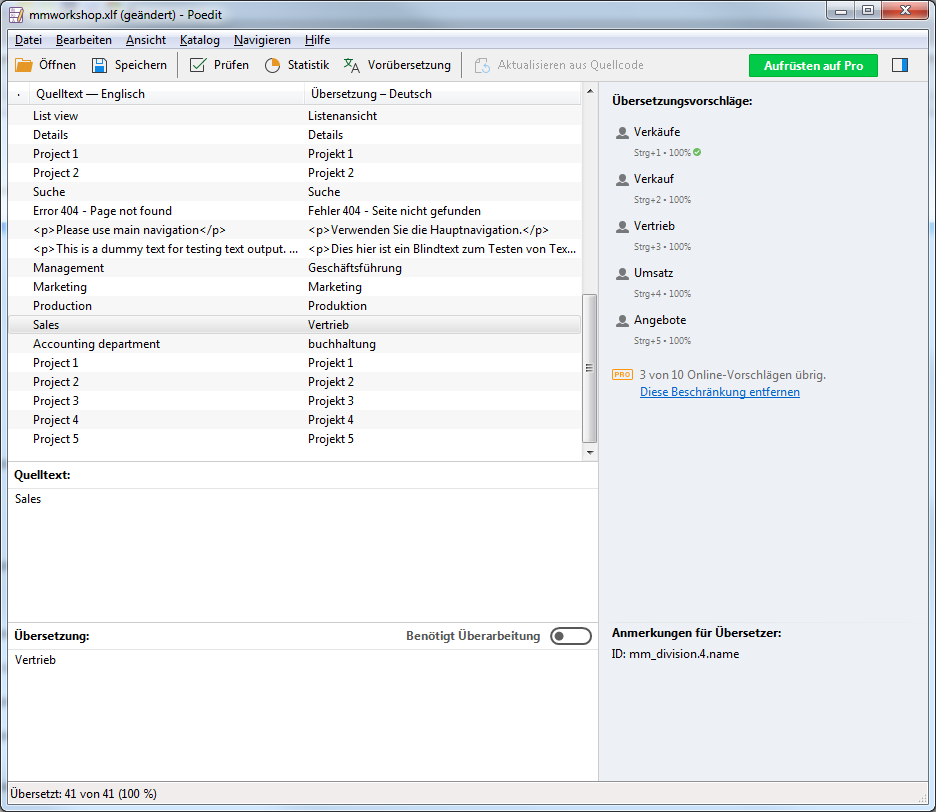
The export generates an XLIFF file that can be read by common translation tools — for example Poedit. XLIFF is the standard when working with translation agencies.
Once translations have been entered into the exported XLIFF file, it can be re-imported.
Export and import are done via console commands — configuration is done via a YAML file that you create yourself.
A mapping provider is required for assigning Contao content — currently the Changelanguage extension is supported.
The following modules/extensions are currently supported:
Contao (Core)
MetaModels (data and backend)
Isotope 2.x
RockSolid Custom Elements
More on further plans and development see below
Early Adopter Program
The project is complete at version 1.0 but is not yet freely available. Refinancing is done via an “Early Adopter Program”, meaning you can use the extension immediately upon payment of a donation. The payment entitles use for one project. Legal claims of any kind are excluded after payment of a donation.
The amount of the donation should be at least €350*1.
A receipt with VAT stated (or net for EU countries with a valid EU tax ID) will be issued for
contributions.
For interest or further questions, please send an email to info@e-spin.de
*1 Net — plus VAT if applicable.
Installation via Contao Manager or Composer
Prerequisites for installation:
MetaModels core 2.1/2.2/2.3/2.4
Contao 4.4.x/4.9.x/4.13.x/5.3.x
Configuration
After successful installation, the export and import must be configured according to your own requirements.
First, create a /translations folder in the Contao installation directory. This is where
exported XLIFF files are stored and from where they are read back during import.
Additionally, a configuration file .translation-jobs.yml must be created in the project
folder of the Contao installation. This configuration file defines what should be exported or
imported — e.g. only Contao, only MM, or both — and individual jobs are defined here that are
started via console commands.
The configuration file is divided into the sections dictionaries and jobs — the
parameters are as follows (see also example):
Note
If the following message appears during composer update
No default map builder defined, please install an extension that provides “cyberspectrum_i18n.contao.default_map_builder”.
this indicates that an extension like Changelanguage or similar is missing
dictionaries
*Source name: name used in jobs forsourceortarget; for typexliffthis is the name of the .xlf filetypeType:contao,metamodels,compound,memory, orxliffnameName: depends on the typecontao:contaometamodels:<table_name>compound:*freely assignablememory:*freely assignablexliff:*freely assignable
Dictionaries of type compound can in turn contain existing dictionaries and extend them with
additional sources — see example
jobs
*Job name: name used in console calls or in other jobstypeType:copyfor copying translation data, orbatchfor calling/grouping existing jobs
Type copy:
source: source name from dictionariestarget: target name from dictionariessource_language: language code e.g.en,defor the source languagetarget_language: language code e.g.de,enfor the target languagecopy-source: defines the behavior when copying from source to targettrue(default): source is always copied to targetif-empty: source is only copied to target if target is empty or not presentfalse: nothing is copied
copy-target: defines the behavior when copying from target to sourcetrue(default): target is always copied to sourceif-empty: target is only copied to source if source is empty or not presentfalse: nothing is copied
remove-obsolete: defines deletion of a text nodefalse(default): nothing is deletedtrue: the text node is deleted when the source is empty or no longer present
filter: list of RegEx filters on theidin thetrans-unitnode to exclude content
Type batch
jobs: list of job names to be processed
Export
Export is done via a console command with a job name as a parameter — e.g.
php vendor/bin/contao-console i18n:process export-all -c`pwd`/.translation-jobs.yml
A single language can also be exported if a corresponding job has been defined — e.g.
php vendor/bin/contao-console i18n:process export-en-ru -c`pwd`/.translation-jobs.yml
The --help parameter outputs all available parameters — e.g. the verbose parameter
(-v, -vv -vvv) for more detailed output, or --dry-run for a “dry run”.
Import
Import works analogously to export — e.g.
php vendor/bin/contao-console i18n:process import-all -c`pwd`/.translation-jobs.yml
or
php vendor/bin/contao-console i18n:process import-en-ru -c`pwd`/.translation-jobs.yml
Debug
It is possible to inspect the translation mapping for problems. ChangeLanguage is currently available as a mapping provider.
For debugging, the command is called with the table of the source language and the target
language as parameters. The --help parameter outputs help text.
A debug call might look like this:
php vendor/bin/contao-console debug:i18n-map tl_article.tl_content en de
This is followed by a tabular listing of the mapping. Where applicable, warnings about problems are shown beforehand, such as:
WARNING   [app] Article 17 (index: 0) has no fallback set, expect problems, I guess it is 13
["id" => 17,"index" => 0,"guessed" => 13,"msg_type" => "article_fallback_guess"]
In this case, you should find the article with ID 17 in the backend and check the fallback article setting.
WARNING   [app] Content element 6997 has different type as element in main. Element skipped.
["id" => 6997,"mainId" => 7515,"msg_type" => "article_content_type_mismatch"]
The “Change-Language” mapping provider only allows referencing at the page level. Articles and their content elements are compared based on their order. If there are type differences, the above message is output; the ID of the CE in the main language would be “7515” here.
If, for example, there are elements in the language to be translated that cannot be found in the main language, the following message appears:
WARNING   [app] Content element 7956 has no mapping in main. Element skipped.
["id" => 7956,"msg_type" => "article_content_no_main"]
Example
 1 dictionaries:
 2   contao_all:
 3     type: contao
 4     name: contao
 5
 6   combined-content:
 7     type: compound
 8     name: content
 9     dictionaries:
10       content: contao_all
11       my_staff_export:
12         type: metamodels
13         name: mm_staff
14       # Shorthand version: name as key
15       # mm_staff:
16       #   type: metamodels
17       mm_division:
18         type: metamodels
19       mm_projects:
20         type: metamodels
21
22   mmworkshop:
23     type: xliff
24
25 jobs:
26   ## Export
27
28   # EN => DE
29   export-en-de:
30     type: copy
31     source: combined-content
32     target: mmworkshop
33     source_language: en
34     target_language: de
35     copy-source: true
36     copy-target: if-empty
37     remove-obsolete: true
38     filter:
39       - /^content\.tl_article\.[0-9]+\.title$/
40       - /^content\.tl_article\.[0-9]+\.alias$/
41
42   # Export all.
43   export-all:
44     type: batch
45     jobs:
46       - export-en-de
47
48   ## Import
49
50   # EN => DE
51   import-en-de:
52     type: copy
53     source: mmworkshop
54     target: combined-content
55     source_language: en
56     target_language: de
57     copy-source: false
58     copy-target: true
59     remove-obsolete: false
60     filter:
61       - /^content\.tl_article\.[0-9]+\.title$/
62       - /^content\.tl_article\.[0-9]+\.alias$/
63
64   # Import all.
65   import-all:
66     type: batch
67     jobs:
68       - import-en-de
69
70   all:
71     type: batch
72     jobs:
73       - export-all
74       - import-all
The dictionaries mm_staff, mm_division, and mm_projects are the translated
MetaModels — from mmworkshop the filename mmworkshop.xlf is derived. Jobs are called
on the console using job names such as export-all or import-all.
An exported XLIFF file can be opened and edited in an XLIFF editor such as Poedit — see screenshot:
Extension Possibilities
Output types
po
csv
xml
Donations
Thanks for the donations* for the extension to:
N.N.: 2,700 €
iMi: 350 €
Paus medien: 350 €
(Donations are net amounts)