Loupe-based Full-Text Search
Note
Available from MetaModels 2.4 — requires at least PHP 8.3.
Loupe is a full-text search engine based on SQLite. The implementation is inspired by the search engine Meilisearch, but with the advantage of requiring relatively low technical resources — PHP and SQLite are sufficient. Loupe has implemented various features such as stemming, similarity search based on Damerau-Levenshtein, ranking, stop words, and much more — see Loupe.
A dedicated filter rule was built for MetaModels to use the Loupe search engine. In the settings, the attributes to be indexed can be selected and thresholds for typos can be specified.
The order of the attributes to be indexed is factored into the ranking, meaning the attributes should be sorted by their importance for the search. This option can be disabled with the checkbox “Disable ranking by attribute order”.
The typo thresholds specify how many “spelling errors” are allowed for a given word length — typical values are, for example, one typo for a word length of five letters and two typos from nine letters onwards.
Indexing of attribute content happens automatically when records are saved. A full reindex is triggered via the corresponding icon in the filter rule list. The exact process and required settings are explained below.
The filter rule should be placed first in the filter because this determines the order of results (items) — the order reflects the ranking of matches (see below).
In the frontend there is a text input for the search. Exact word groups can be
delimited in the search string with ". Words or phrases can be excluded with -.
Currently, the following attributes are indexed:
Text
Long text
Translated text
Translated long text
Single select [select]
Multi-select [tags]
Sorting and Output
For records (items) to be sorted by search relevance (score), the filter rule must be placed first in the filter. The first filter rule that provides a list of item IDs always determines the fundamental order of records to be output. This means that after the Loupe filter rule, a “Custom SQL” filter rule can be added that provides a sort order when Loupe is not being queried — e.g. by name. Additionally, no custom sorting must be set in the list settings, as this would always override the order.
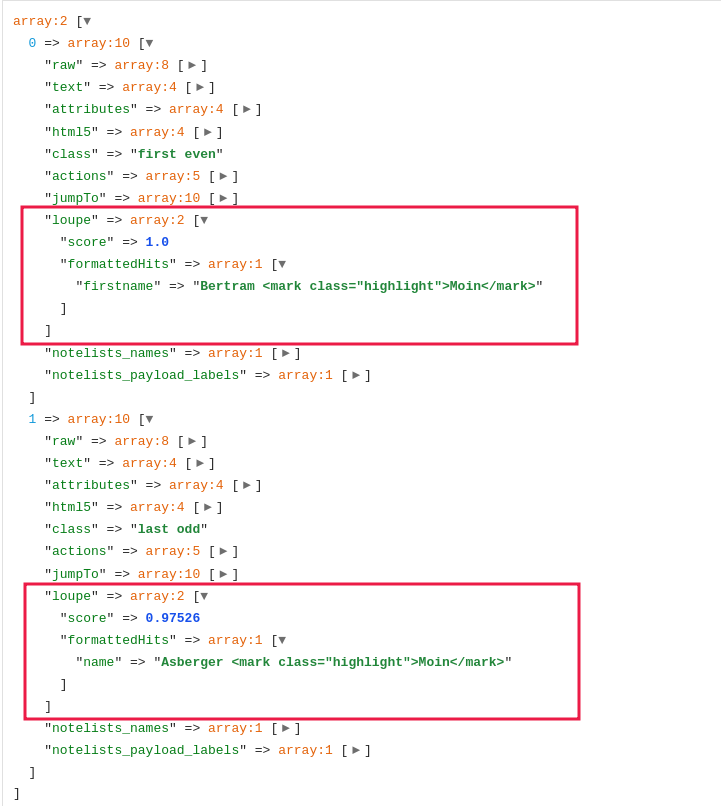
When Loupe filtering is active in the filter, the records’ output array contains a
loupe key. In this node, the calculated relevance of the record is given as
score.
1<?php if ($arrItem['loupe']['score'] ?? false): ?>
2    <p>Score: <?= \Contao\System::getFormattedNumber($arrItem['loupe']['score'], 4) ?></p>
3<?php endif; ?>
In the filter rule settings, the “Highlight search terms” option can be activated. If
so, in addition to the score, the formattedHits node also outputs the attributes
where matches were found during the search. The matches are present in the array
including a highlighting marker.
As an example, the following screenshot — here a search was performed for “Moin” and there were two matches. Although both records contain the word “Moin” in the same spelling, the score of the second record is lower. This results from the configured order of attributes in the filter rule: first name (firstname) before last name (name).
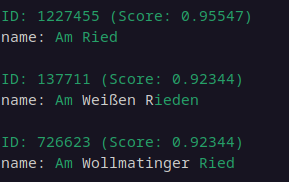
In addition to the frontend output, the search can also be run via the console — e.g. for checking the index; the filter rule ID and search string are passed as parameters.
php contao/bin/console metamodels:loupe:test-index 11 "Am Ried"
The output includes the index ID and score, as well as the attribute name and a color-coded indicator of the match.
Configuring Stop Words
Individual words can be defined to be skipped during search and ranking — more on this at Loupe.
Stop word handling also includes words formed, for example, through
stemming.
For example, to avoid searching for the frequently occurring for when the user
inputs forms, for should be added to the stop words list.
Stop words are not excluded during indexing, only during searching. However, if a stop
word is entered on its own (e.g. for), it will still be searched for.
The stop words list is stored in your own config.yml. A separate section can be
defined for each language set up in the MetaModel — for all monolingual models, the
list goes under default.
Example:
 1# config/config.yml
 2meta_models_filter_loupe:
 3  stop_words:
 4    default:
 5      - ein
 6      - der
 7      - die
 8      - das
 9      - für
10    en:
11      - a
12      - an
13      - by
14      - for
15    de:
16      - der
17      - die
18      - das
19      - ein
20      - für
Indexing Process and Settings
When a record with changed content of indexed attributes is saved, or when reindexing is triggered in the filter rule, the processing does not happen directly in the web request (synchronously). Instead, a message is passed to the Symfony Messenger for asynchronous processing. More on this topic in the Contao documentation or talk at CK23.
The “messenger jobs” are stored in the tl_message_queue table — which will be
created if it does not exist.
Currently, a
“transport configuration”
must be defined in config.yml for processing messenger jobs — the following is for
Loupe:
1# config/config.yml
2framework:
3  messenger:
4    routing:
5      MetaModels\FilterLoupe\*: contao_prio_high
6# Alternative: separate settings also possible
7#      MetaModels\FilterLoupe\Messenger\IndexMessage: contao_prio_high
8#      MetaModels\FilterLoupe\Messenger\ReIndexMessage: contao_prio_normal
In a future version, we will implement full integration with Contao’s implementation so this will no longer be necessary.
The messenger in turn waits to be triggered for further processing. This is done by Contao’s cron job — which should be configured accordingly.
During indexing, a separate index is created as a SQLite database for each filter rule
— for multilingual models or multilingual attributes, there is a separate index for
each language. The data is stored under
var/mm_loupe_index/<id-of-loupe-filter-rule>/.
Reindexing can be triggered manually after creating a new filter rule or when settings
are changed. This clears the index database beforehand. It is started via the icon in
the filter rule list or via the console — the optional parameter -p can adjust the
number of items processed per entry in tl_message_queue; default is 50.
php contao/bin/console metamodels:loupe:reindex -p 1000