Filter-by-related for MetaModels
Note
Filter-by-related is still in fundraising and will only be released once the
target amount of currently 3,575.00 € is reached.
Early installation via the “Early Adopter Program” is possible — see below
The “Filter Parent” filter rule has been merged into this filter rule — the
restriction of the relation to child tables has been lifted.
Filter-by-related allows items to be filtered by properties of a related (relational) MetaModel. Single select (select) or child table relations are supported.
Examples: We have employees and business trips — the business trips are defined as a child table of employees. If you want to output all business trips whose employees belong to department xy, you need a special filter — especially when you want the filtering to be variable in the frontend.
Another example would be dates for seminars, when the same seminars take place repeatedly on different days. For a seminar, all basic properties such as title, content, and category could be defined, and for a date, there is a single select to the seminar along with the date, number of participants, etc. To filter the list of dates by a seminar category, this filter rule makes it possible.
Early Adopter Program
Refinancing is done via an “Early Adopter Program”, meaning you can use the extension immediately upon payment of a donation. The payment entitles use for one project. Legal claims of any kind are excluded after payment of a donation.
The amount of the donation should be at least €200*1.
A receipt with VAT stated (or net for EU countries with a valid EU tax ID) will be
issued for the donation.
For interest or further questions, please send an email to info@e-spin.de
*1 Net — plus VAT if applicable.
Installation via Composer
Prerequisites for installation:
MetaModels Core from version 2.4 with at least PHP 8.2
The module can be installed via the console or via the Contao Manager.
Creating the Filter Rule
The filter rule is created as usual under Filters. The settings are derived from the “Simple Lookup” filter rule. As the filter type, “Filter on attribute of the model with a relation” is selected. The following mask then appears:
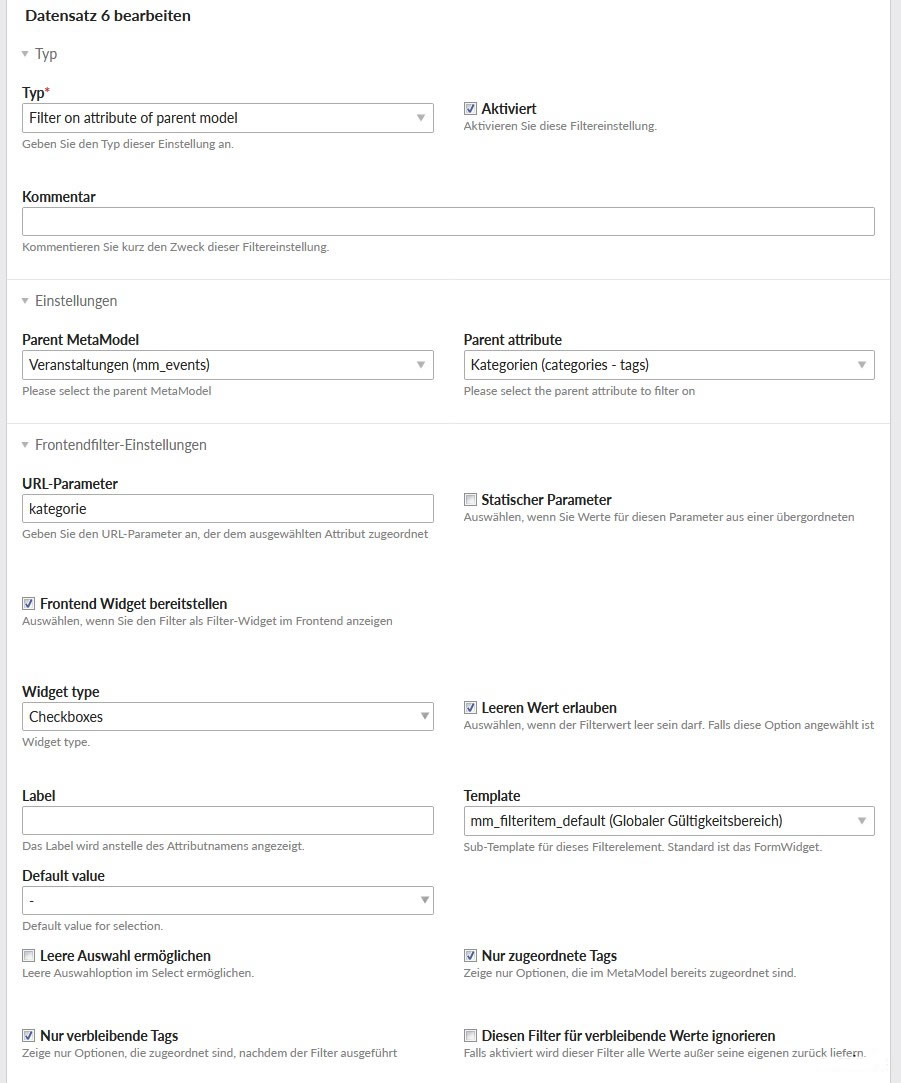
In the settings, the “Model for the relation” and the attribute acting as the filter as “Attribute of the relation model” must be selected. For “Column/attribute of the relation”, select PID for child tables and the corresponding attribute for single select relations.
The remaining setting parameters are analogous to the “Simple Lookup” filter rule.
Donations
Thanks for the donations* for the extension to:
N.N.: 400 €
N.N.: 400 €
Agency Markenzoo: 200€
(Donations are net amounts)