Perimeter Search
Introduction
The perimeter search allows records to be filtered by their geographic position relative to a given address and radius. The filter determines whether a record lies within the specified radius, or whether the geographic distance between the filter input point and the record’s point is below a given threshold. The reference point (“center”) of the “filter circle” is the address entered in the filter. The spherical distance between the two points is calculated using the Haversine formula.
The calculation of the distance from records to the entered address is based on longitude and latitude. Both values must be available for the address stored in the MetaModel as well as for the entered address.
For addresses stored in the MetaModel, an attribute for longitude and one for latitude must be created, e.g. as “geo_lat” and “geo_long”, with the type “Decimal” or “Text”.
The resolution of the entered address to longitude and latitude is performed directly when the filter request is submitted in the frontend via a “lookup” — the services of Google Maps or OpenStreetMap are available for this.
The following is a quick guide to configuring the perimeter search.
Install Filter
Install the package “metamodels/filter_perimetersearch” via the Contao Manager or on the console. After installation, there should be an additional filter rule “Perimeter Search”.
Create Attributes
An attribute of type “Decimal” or “Text” must be created for each of longitude and latitude, e.g. as “geo_lat” and “geo_long”. The attributes are only needed for filtering and do not need to be configured for frontend output.

After creating the two attributes, they can be filled with values, e.g. geo_lat: 52.517365 and geo_long: 13.353159 for the address of Schloss Bellevue in Berlin (Spreeweg 1, 10557 Berlin, Germany).
Create Filter
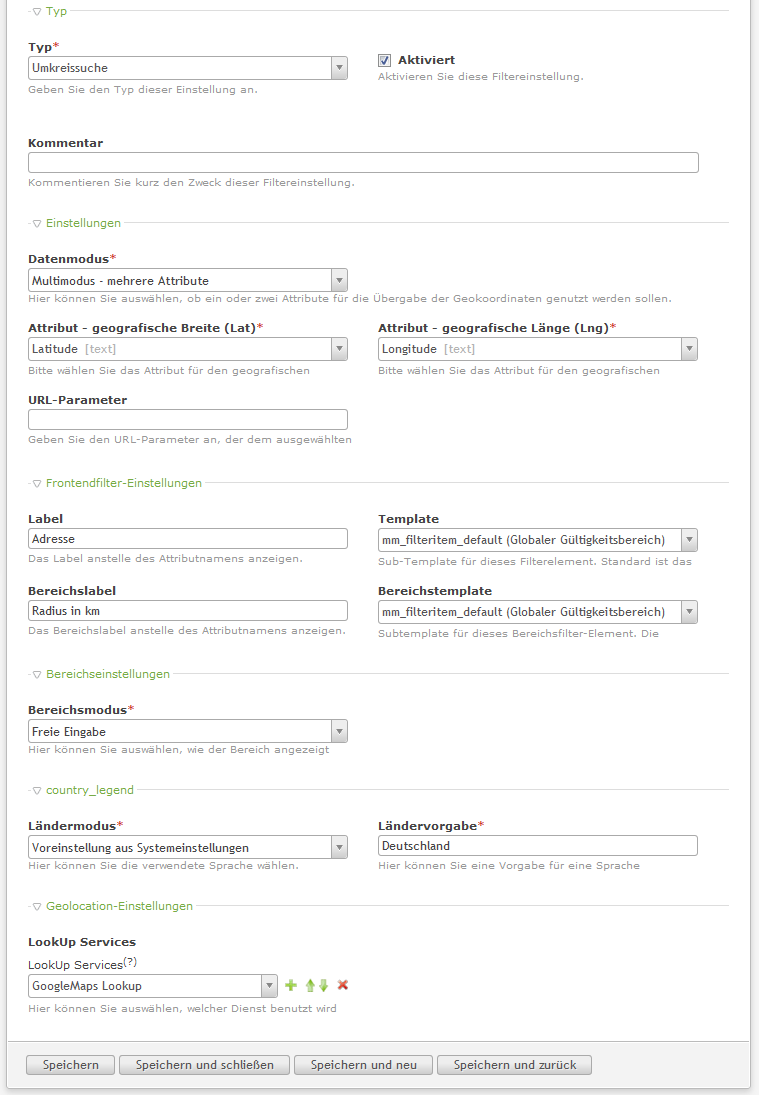
Under filter sets, create a new filter set with a name such as “Perimeter Search” and then add a filter rule of type “Perimeter Search” with the following settings:
Type: Perimeter search
Data mode: Multi mode (currently only multi mode available)
Attributes for latitude and longitude: select the corresponding attributes
Label: label for the address input (“center”) — e.g. “Address”
Range label: label for specifying the radius size — e.g. “Radius in km”
Range mode: choose whether a free input field or fixed values (selection mode) — a default value can be specified for a list of fixed values
Country mode: specify whether and if so which country to add to the address for the lookup search (e.g. preset with “Germany”)
LookUp service: choose whether Google Maps, OpenStreetMap, or direct coordinates — multiple services can be configured and are processed in sequence
Set Up Filter in the Frontend
In the frontend, there should be a MetaModel list to be filtered with the filter set activated (e.g. “Perimeter Search”).
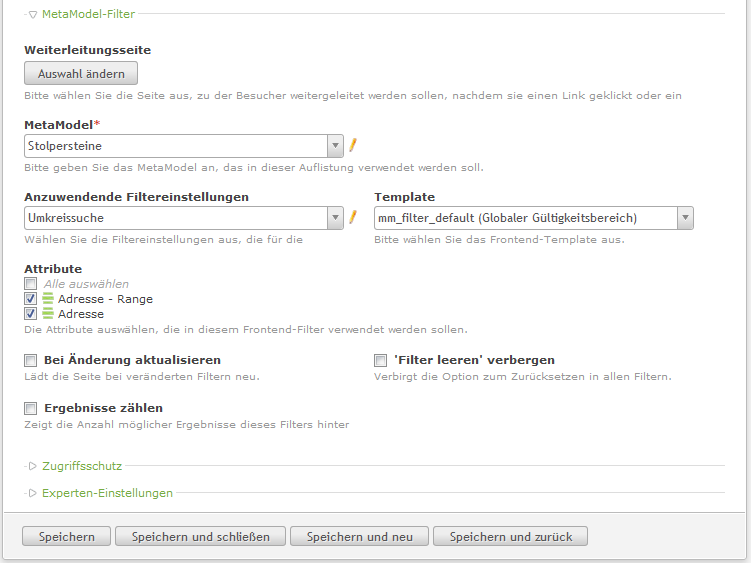
In the MetaModel frontend filter, the corresponding MetaModel and the “Perimeter Search” filter set are activated. The attributes of the perimeter search filter are also activated.
The “Update on change” setting should not be selected, as otherwise the form would already start processing when only one of the address/radius values is changed.
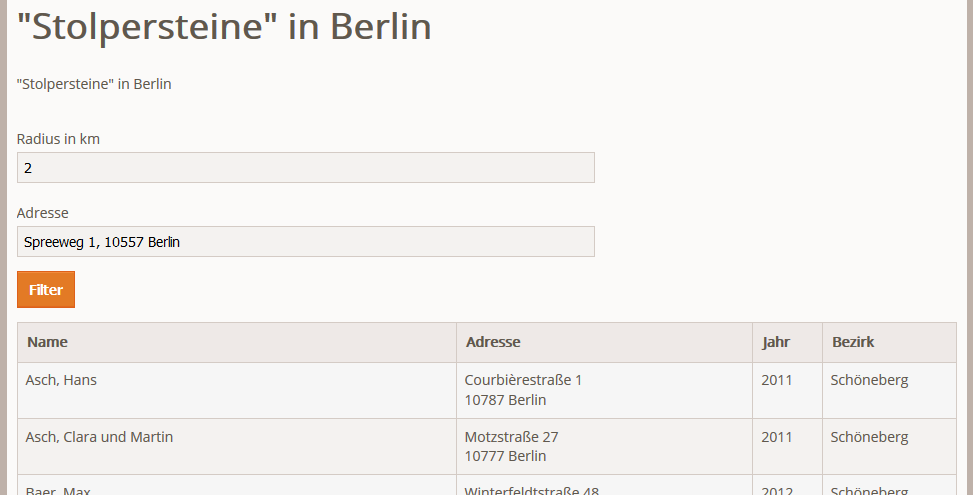
The frontend output should now show a filter with two input options that can be used to filter the list.
Notes
For filtering, the address must be entered as precisely as possible. Currently, multiple lookup results for a single address entry are not handled.
If the frontend filter receives both the address and the specific coordinates — e.g. from a GPS determination via JavaScript — the “Coordinates” option should be placed first in the lookup services list.
Resolving an address to longitude and latitude when entering data in the backend is also possible via the lookup service — see the talk at CK23
In a future extension, the labels will become multilingual.
Bugs and notes please file at Github — financing of further features or continued development is also welcome.
Geo Distance
The perimeter search finds records that lie within a perimeter. To also know how far
the data points are from the reference address, the “Geo distance” attribute must
additionally be installed. This “virtual attribute” is solely responsible for
calculating the corresponding distance during a perimeter search filter and passing
it to the records. The default value of the attribute is -1. The output is in km.
Create Attribute
The attribute settings are analogous to those of the filter rule — note the “GET parameter for address” field, whose value must be identical to the “URL parameter” value of the perimeter search filter rule.
GET parameter for address: URL parameter of the perimeter search filter rule
Data mode: Multi mode (currently only multi mode available)
Attributes for latitude and longitude: select the corresponding attributes
Country preset: specify whether and if so which country to add to the address for the lookup search (e.g. preset with “Germany”)
LookUp services: choose whether Google Maps, OpenStreetMap, or direct coordinates — multiple services can be configured and are processed in sequence
Notes
To sort results in the MM list by geo distance after a perimeter search, select the geo distance attribute in the “Sort by” option along with Ascending (ASC).
If the list should normally be sorted by another attribute like name etc. and only switch to geo distance sorting during a perimeter search, this must be configured accordingly. First, the “Allow override of sorting” checkbox must be activated. This allows the sorting to be dynamically adjusted.
For example, in the MM list template, an automatic
redirect can be set up — whether the perimeter search is active can be determined via
filterParams with the URL parameter address:
1<?php
2if(\array_key_exists('address', $this->filterParams)) {
3    // redirect sorting: geo distance (with parameter)...
4} else {
5    // redirect sorting: default sorting (without parameter)...
6}
More on sorting parameters here.