Note List (Wishlist) for MetaModels
The note list (Notelist) extends MetaModels with the ability to add individual records (items) to a note list in the frontend output.
Use cases for the note list range from a “normal watchlist” to comparison lists of product properties and shopping cart functionality.
Once a record is stored in a note list, it can of course also be removed from the list.
The note list comes with a new filter rule that can filter a MetaModels list by existing note list records.
A new widget was created for the form generator that lists the records of the note list and includes them in emails — sending emails via the Notification Center is also possible.
Multiple note lists can be created for each MetaModel. This allows, for example, adding a record to two note lists like “Favorites” and “Order”, or transferring a record from one note list like “Watchlist” to another note list “Order”.
A filter can be set in the note list configuration so that only certain records can be added to the note list — e.g. only employees from the “Sales” department.
The note list also works with translated MetaModels so that note list records are preserved when the language is switched.
Installation via Contao Manager or Composer
Prerequisites for installation:
Contao 5.3:
Note
The note list is ready to use but will only be released once the current
fundraising target of 3,685€ is reached.
For access please send an email to info@e-spin.de
^PHP 8.2
MetaModels 2.4
Notelist 2.4
optional Notification Center 2.3 or NCPro
Access to the protected repository — credentials after donation
Contao 4.13:
^PHP 8.1
MetaModels 2.3
Notelist 2.3
optional Notification Center 1.7 or 2.3
Creating a Note List
After successful installation, a new icon appears in the MetaModels icon row, which leads to creating and editing note lists.
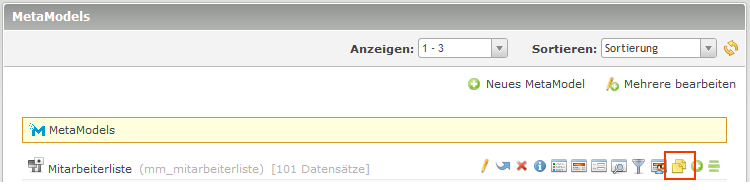
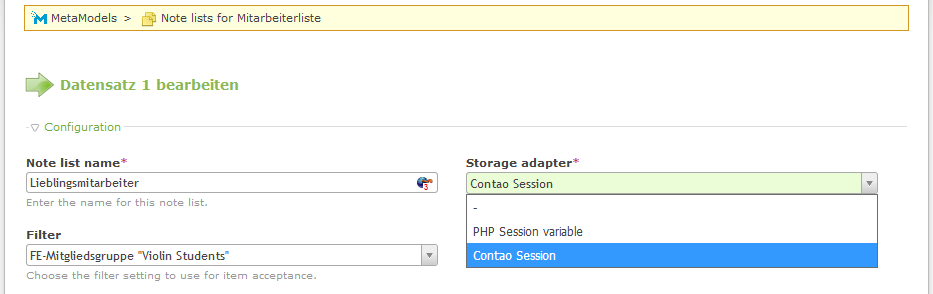
When creating a new note list, a name can be assigned. Currently available “storage adapters” are PHP session and Contao session. With the Contao session, the values of a note list are automatically stored in the session values of the database for logged-in members and are available again after re-login.
The filter selection allows restricting which records can be added — e.g. based on “Department” or member groups. Filtering by member groups is possible, for example, via the “condition membergroup filter” extension.
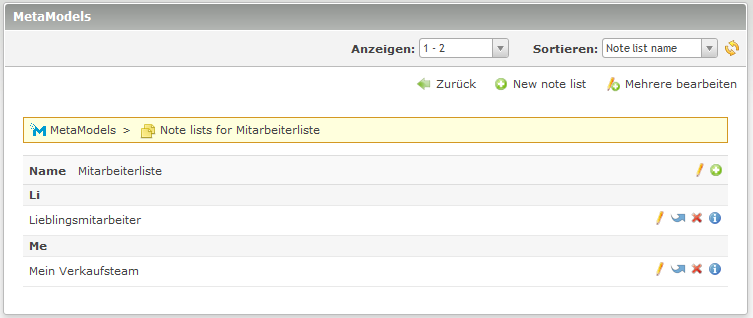
The list view provides access to all created note lists.
Activating the Note List in a MetaModels List
In the MetaModels list CE or FE module, there is a new “Notelist” section where one or more of the created note lists can be activated.

The order of the “action outputs” can be changed by sorting the note lists via drag & drop.
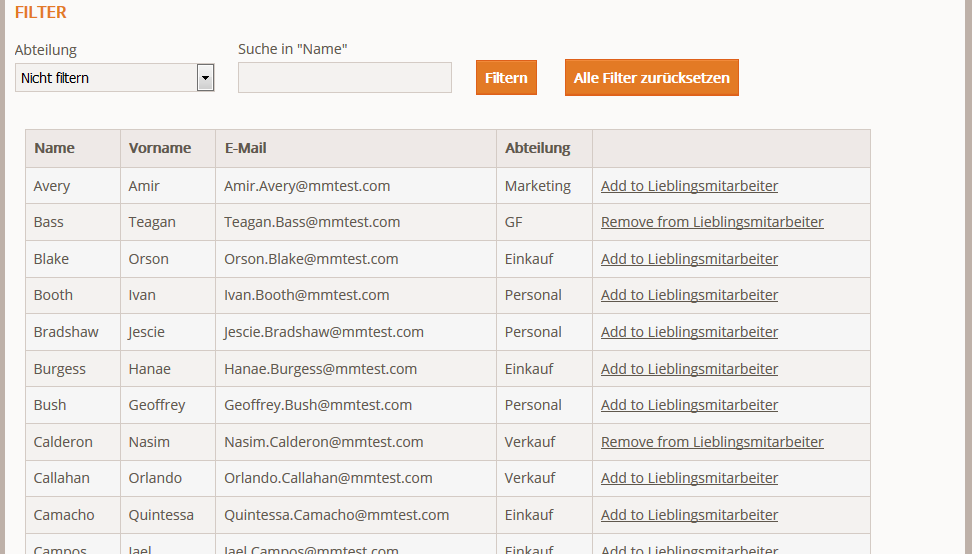
If the default template is used for output, no further changes are needed and the frontend list view should show an additional link for adding to the note list next to each record.
If a custom template is used, an appropriate adjustment is needed for the new links. The links are contained in the action node and can be output, for example, with the following code (number corresponds to the note list ID):
1<a href="<?= $arrItem['actions']['notelist_1']['href'] ?>" class="<?= $arrItem['actions']['notelist_1']['class'] ?>"><?= $arrItem['actions']['notelist_1']['label'] ?></a>
Displaying the Note List via Filter
The frontend display of the note list is done via a standard MetaModels list that is filtered to the note list elements.
For the filtering, a filter with the new “Notelist” filter rule must be created. In the filter rule, simply select the note list whose elements should be displayed.

In the frontend output of the filtered list, only the employees from the note list are shown.
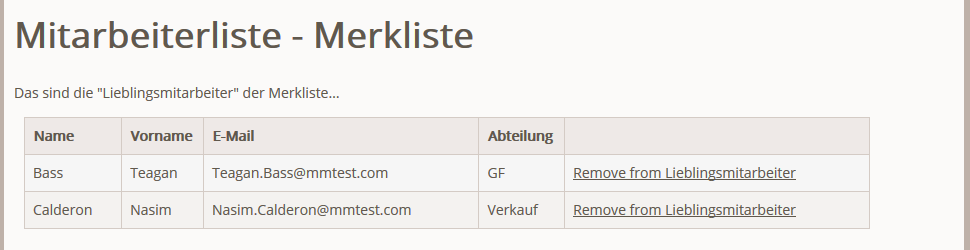
In the list output, it would be possible, for example, to activate another note list to transfer elements from one list to another — e.g. from “Watchlist” to “Order”.
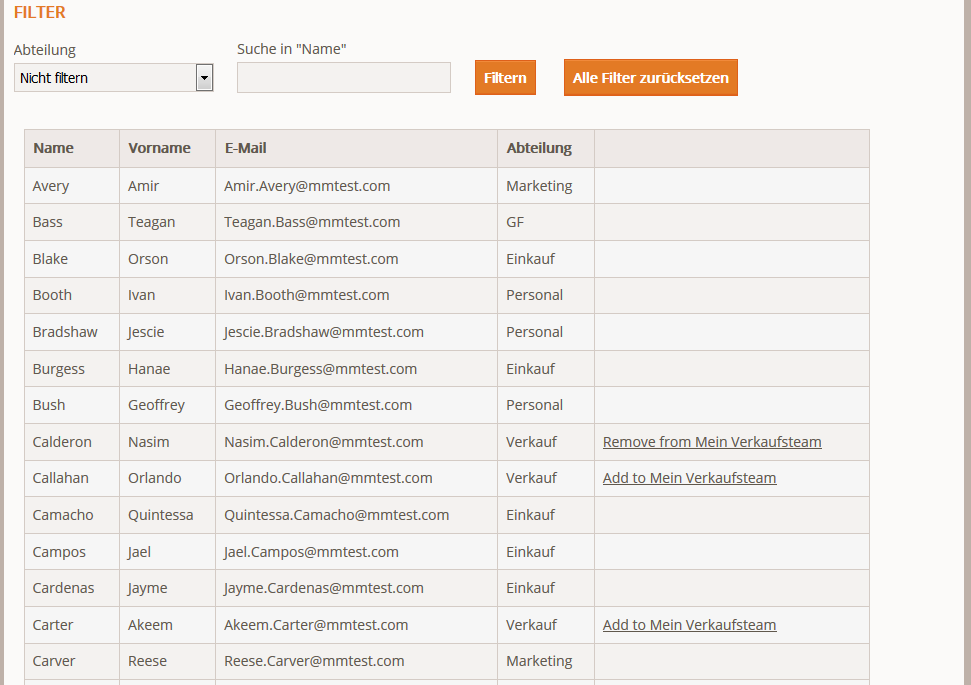
In the note list settings, an optional filter can be set for adding to a note list. If only employees belonging to Sales are allowed, the list looks as follows:
Data Display and Submission in Forms
A new “MetaModels Note List” widget is available in the form generator. This widget controls both the display of note list records in the form and in the email. If multiple note lists were created for a MetaModel, multiple can also be output.
The configuration options had to be integrated into the possible interfaces of a Contao widget, so selections must be made in several places.
In the “Template settings” section, there is a template for both the form output
(form field template) and the email (email template), which wraps the output list as a
“wrapper”. In the templates, all note lists are output in a loop with display of the
name and the records within (see “Field configuration” section). Note that the template
for the form form_metamodels_notelist.html5 is still an “old” template — while the
email already uses a Twig template email_metamodels_notelist.text.html.twig.
In the “Field configuration” section, you can select which note list(s) should be output. For list output in the form as well as in the email, corresponding render settings must be set up to output the desired attributes. Additionally, for each note list the “Clear list” checkbox determines whether the list should be cleared after form processing.
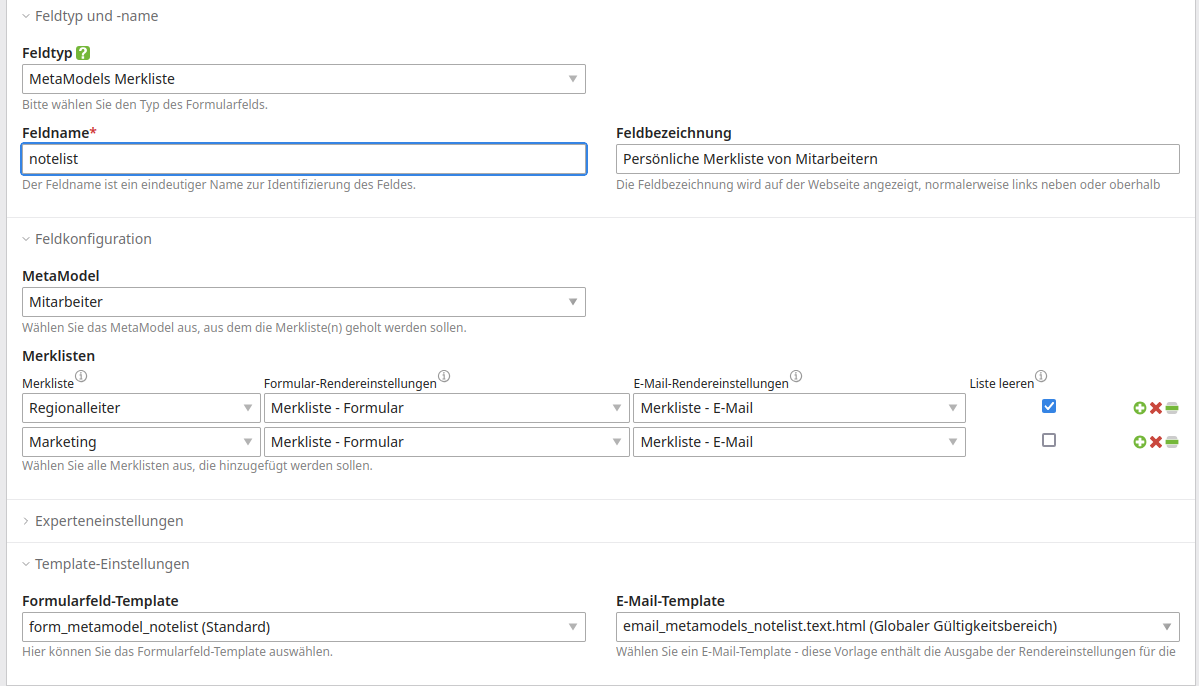
For the render settings, note that for output in a standard Contao form email, only
text format is supported — for HTML email output, the
Notification Center
extension should be used. As templates for render settings, the extension provides
metamodel_prerendered_notelists_form.html5 and
metamodel_prerendered_notelists_form.text.
The templates also automatically output data that can be passed additionally to each note list record (payload). This is possible via a “mini” form or event listeners.
In the list templates, in addition to the usual raw and text nodes, notelists_names
is also present as a list of note list names.
The payload is passed via the notelists_payload_values and notelists_payload_labels nodes.
Template hierarchy overview:
Form output on the website:
form_metamodels_notelist.html5— wrapper from form widget with output of all note lists including namemetamodel_prerendered.html5— list template from the selected render settings; alternatively select templatemetamodel_prerendered_notelists_form.html5for payload output
Email output:
email_metamodels_notelist.text.html.twig— wrapper for email with output of all note lists including namemetamodel_prerendered.html5— list template from the selected render settings; alternatively select templatemetamodel_prerendered_notelists_form.html5for payload output
Note
This option is available from MM 2.4 with Contao 5.3
For HTML email output, the Notification Center extension should be used. Dedicated Simple Tokens are available that start with “##mm::” — these are:
##mm::notelist_name::<id-notelist>##— output of the note list title for the ID as text##mm::notelist::<id-notelist>::<id-rendersetting>##— output of note list items for ID with render setting ID as text##mm::notelist::<id-notelist>::<id-rendersetting>::html##— output of note list items for ID with render setting ID as HTML
When you type “##mm”, the available tokens are displayed.
These values allow individual customization of the output in the form widget as well as in the email. The existing templates can be overridden with custom variants as usual.
Note
Editing (e.g. deleting) note list elements within the form is not possible, as reloading the page would lose data already entered in the form.
Before the form is displayed, a list of all note list elements can be shown where they can be individually edited or the entire list can be cleared — see link:
1<p><a href="de/metamodels/note-list-contact-form.html?notelist_2_action=clear">Clear List 2</a></p>
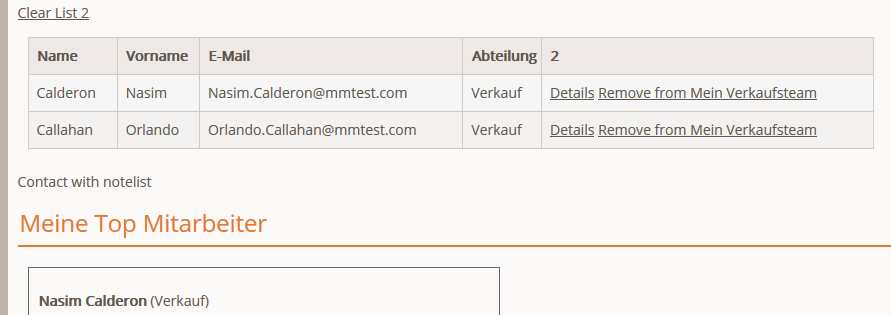
Data is transmitted by email and the output can be customized via the email template. For sending, the Contao form option or the “Notification Center (NC)” are available.
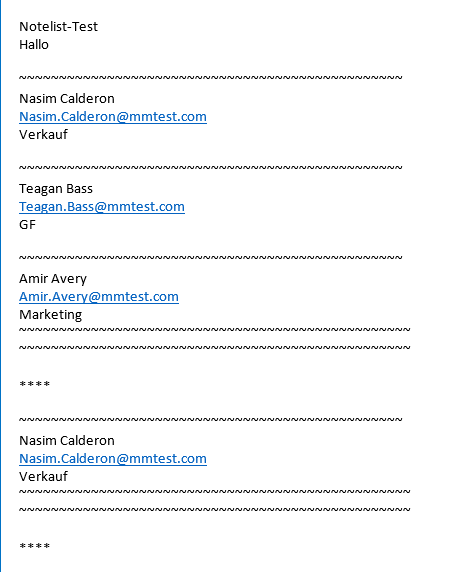
When using the NC, the text output of email rendering can also be converted to HTML via
a custom simple token, e.g. newlines to <br> tags. In
NCpro
it is very easy to define custom tokens in the backend — the Twig filters nl2br and
raw help with output.
Submitting Additional Data for Each Item
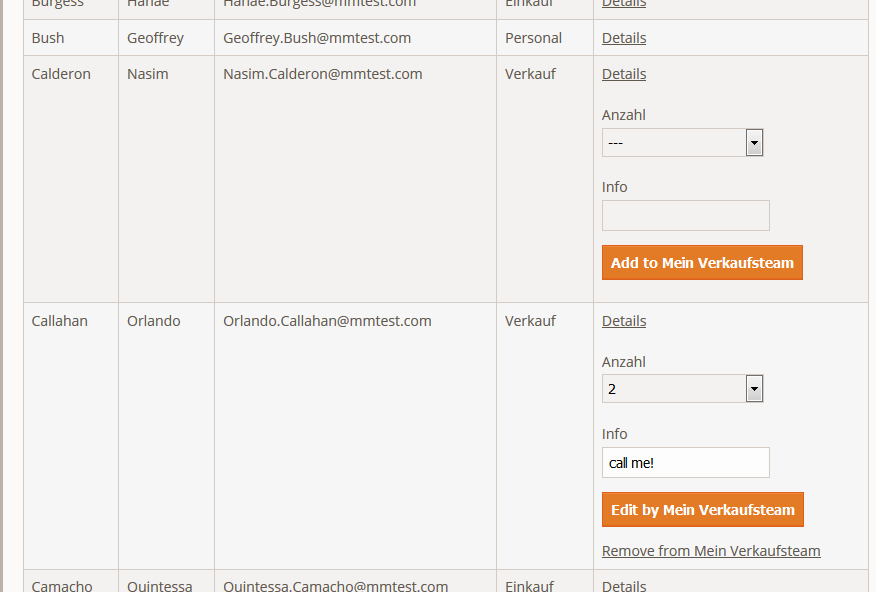
Optionally, additional data can be submitted to the note list for each item, such as a quantity, free text, etc. For this, a form is created via the form generator containing the fields to be displayed — e.g. a select field for a quantity and a text field for a brief note. A submit field is not required and is generated automatically.
This created form is now available in the note list settings — forms that already contain a note list form element are not displayed (to avoid recursion!).
In the list display, the form is now shown for each item along with an “Add/Edit” button. The data is also processed by the form and, for example, sent by email (see above).
Events
To monitor manipulation of a note list (add, remove, clear), an event listener is available.
The event listener can be used, for example, to send feedback to the website or to log/track the actions.
As an example, a listener for feedback can be created as follows (see also Registering Services):
 1<?php
 2// src/EventListener/ManipulateNoteListListener.php
 3namespace App\EventListener;
 4
 5use Contao\Message;
 6use MetaModels\NoteListBundle\Event\ManipulateNoteListEvent;
 7use Terminal42\ServiceAnnotationBundle\Annotation\ServiceTag;
 8
 9/**
10 * @ServiceTag("kernel.event_listener", event="metamodels.note-list.manipulate")
11 */
12class ManipulateNoteListListener
13{
14    public function __invoke(ManipulateNoteListEvent $event)
15    {
16        // Only handle note list "1".
17        if ('1' !== ($listId = $event->getNoteList()->getStorageKey())) {
18            return;
19        }
20
21        switch ($event->getOperation()) {
22            case ManipulateNoteListEvent::OPERATION_ADD:
23                Message::addConfirmation('Added ' . $event->getItem()->get('id') . ' to ' . $listId);
24                // Add your own notes in metaData.
25                $metaData = $event->getNoteList()->getMetaDataFor($event->getItem());
26                $metaData['tstamp'] = time();
27                $event->getNoteList()->updateMetaDataFor($event->getItem(), $metaData);
28                break;
29            case ManipulateNoteListEvent::OPERATION_REMOVE:
30                Message::addConfirmation('Removed ' . $event->getItem()->get('id') . ' to ' . $listId);
31                break;
32            case ManipulateNoteListEvent::OPERATION_CLEAR:
33                Message::addConfirmation('Cleared ' . $listId);
34                break;
35            default:
36                throw new \RuntimeException('Unknown note list operation: ' . $event->getOperation());
37        }
38    }
39}
On the website, the feedback can be output in a template via Contao Message — e.g. with the following code in a custom template as ce_html_message.html5:
1<?php
2$message = \Contao\Message::generateUnwrapped(null, true);
3?>
4<?php if ($message): ?>
5<div class="alert alert-primary" role="alert">
6    <p class="mb-0"><?= $message?></p>
7</div>
8<?php endif; ?>
Additionally, this event can also be used to store extra information — see OPERATION_ADD.
Known Issues and Next Features
Page(s) with note lists must not be cached
From Contao 4.9, templates with
.textand.twigextensions can no longer be created in the Templates section, as Contao no longer supports this — create these files via SSH/SFTP or locally
Donations
Thanks for the donations* for the extension to:
Version 2.4:
dpmed GmbH: 350 €
afm werbestudio & agentur: 350 €
Version 2.0 to 2.3:
Sebastian Krull: 350 €
Westwerk GmbH & Co. KG: 350 €
Carsten Merz: 350 €
Next Home Creation: 350 €
Niels Hegmanns: 350 €
Hofer Werbung: 350 €
Nationalfonds AT: 350 €
AFM-Werbestudio: 350 €
PITSol: 350 €
ghost.company: 350 €
Druckhaus S+F: 350 €
w3scout: 350 €
Nationalfonds AT: 350 €
Nationalfonds AT: 350 €
AFM-Werbestudio: 350 €
Ulf Spethmann: 350 €
Sienos: 350 €
(*Donations are net amounts)