MetaModels-2-Isotope
Warning
MetaModels-2-Isotope is still in fundraising and will only be released
once the target amount of currently 7,374 € is reached.
Early installation via the “Early Adopter Program” is possible — see below
The “MetaModels-2-Isotope” project provides various components for MetaModels (from 2.1) to pass items (articles, products) from MetaModels to the online shop Isotopeecommerce (Isotope) for purchase (checkout).
The transfer from MetaModels is done via Isotope’s shopping cart. The subsequent purchase process is then carried out as configured in Isotope.
Using the modules for MetaModels does not exclude using the Isotope shop with its normal products. The project aims to make it possible to offer an additional purchase option when using MetaModels, or to supplement Isotope with the extensive configuration and filter options from MetaModels.
A demo shop was set up for testing and comparing the extension against standard Isotope: https://isotope.metamodel.me
The project was implemented by Richard Henkenjohann, Carsten Merz, and Ingolf Steinhardt.
Early Adopter Program
The project is complete at version 2.3 but is not yet freely available. Refinancing is done via an “Early Adopter Program”, meaning you can use the extension immediately upon payment of a donation. The payment entitles use for one project. Legal claims of any kind are excluded after payment of a donation.
There are two donation variants:
1: Access to the three project modules for installation: €390*1 or more
2: In addition to option 1, also the demo shop: €490*1 or more
The extension can be installed via the Contao Manager or via the console (composer). The demo shop includes composer.json, templates, database, and demo files (/files).
A receipt with VAT stated (or net for EU countries with a valid EU tax ID) will be
issued for contributions to the project.
For interest or further questions, please email info@e-spin.de — see also the
MM fundraising website.
*1 Net — plus VAT if applicable.
Features
With the extension, items from MetaModels can be passed to Isotope for a purchase and payment process — these can be products from a catalog or also services such as travel and events, as well as access rights for software or logins.
When transferring to Isotope, various basic information such as article number, name, and price are required as mandatory fields.
If products with weight or quantity information are passed to Isotope, an attribute for base price calculation is available as an option — the base price information is displayed from the Isotope configuration.
An attribute from MetaModels can be selected for passing the weight.
A filter function can be used to exclude items from shipping.
It is also possible to define a file attribute as a download for Isotope. In the implementation via the Isotope bridge, unlike in Isotope, the values for the number of possible downloads and the download end date are not set.
If variants are created in MetaModels, these can also be passed to Isotope. Note that in MetaModels, the (child) variants are each independent records.
Components
The project provides three different components:
isotope-bridge: main component for configuration
attribute_isotopeprice: decimal attribute for price input and tax selection
attribute_isotopebaseprice: attribute for selecting the base price type and quantity input
attribute_isotopeshippingweight: attribute for passing the weight
Configuration and Use
It is assumed that Isotope is installed and configured, as well as MetaModels.
For use, the isotope-bridge component must be installed — the attribute_isotopeprice attribute should also be available. The attribute_isotopebaseprice attribute is only required if base price information is used.
After installation, a new icon with the Isotope symbol appears in the MetaModel view — this is gray in the default configuration (see Sweets), meaning the Isotope bridge is not yet activated here.
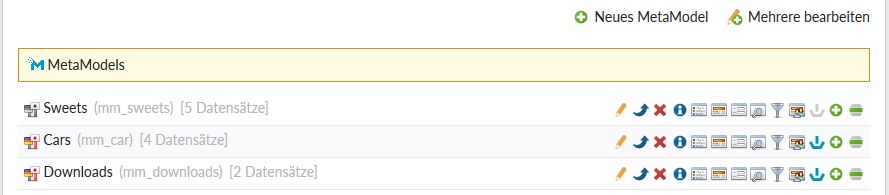
To activate, click the edit pen icon for the corresponding MetaModel and check the “Enable Isotope bridge” checkbox in the “Advanced settings” section. After saving and closing, the Isotope icon changes and becomes colored (see Cars) and is available for configuration.
Before configuring the Isotope bridge, the MetaModel’s attributes should be reviewed or supplemented. The following attributes should be present:
Required fields:
Name (Text, CombinedValues, or similar attribute)
Description (Long text attribute)
SKU/Article number (Alias, Text, Numeric, or similar attribute)
Price (Price (Isotope) attribute or Decimal — note: no taxes possible with Decimal)
Optional:
Image (File attribute)
Base price (Baseprice (Isotope) attribute)
Download (File attribute)
Weight (Decimal attribute)
Once the attributes have been checked, the configuration can be opened in the MetaModels view by clicking the Isotope icon. Here, the mentioned attributes are mapped to Isotope’s specifications and options.

Two additional settings can be made in addition to the basic settings:
“Exempt from shipping” defines a filter for items that should not be shipped, such as downloads — analogous to the Isotope setting
“Jump to render settings” defines the MetaModels render settings configured for list display, to determine the “jumpTo address” for detail display; this setting is needed when items also have a detail page
To display the purchase option in the MetaModels list CE/FE module, the Isotope bridge must also be activated. To do this, create or open the corresponding MM list and activate the “Enable Isotope bridge” option. The options for shopping cart, item quantity, etc. are then available as in the Isotope shop.
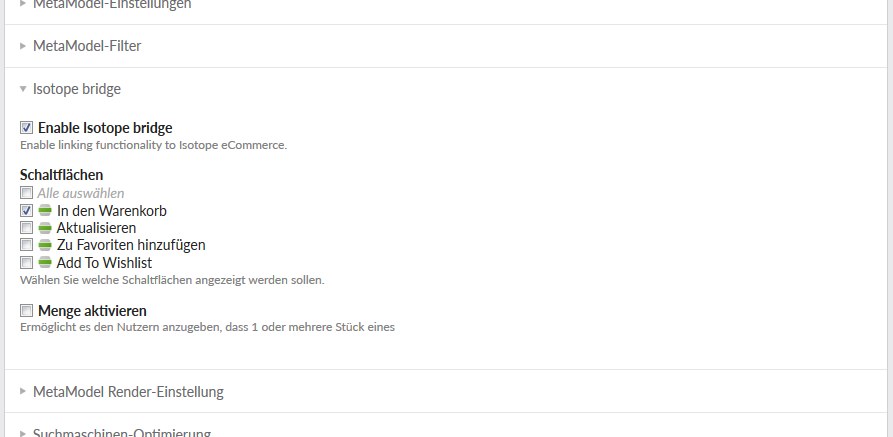
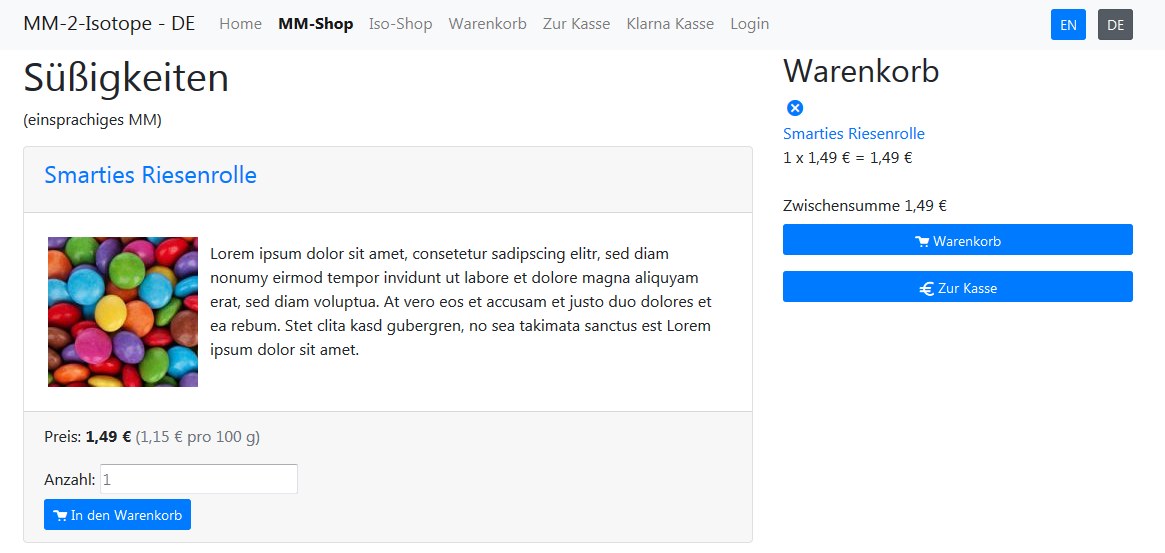
The settings are now complete and the configured buttons for adding to the cart should be visible next to each item in the frontend list view. All further configurations such as shopping cart and checkout are done in Isotope.
Once an item has been purchased, it can no longer be deleted in the backend, as in Isotope.
Demo Shop
A demo shop was set up for testing and comparing the extension against standard Isotope: https://isotope.metamodel.me
Products and product groups were created identically in the “MM shop” and the “Isotope shop” for better comparability. For distinction in the cart and orders, article numbers have a prefix of “MM-” or “ISO-” respectively.
Some notes on the individual product groups:
Sweets/Süßigkeiten are set up as a monolingual MetaModel, so texts do not change when switching the frontend language; the base price was implemented for this product group
Cars/Autos are set up as a multilingual MetaModel, meaning texts and images (flags!) change when switching the language; in the cart and checkout, links to the detail page follow the “jumpTo” settings from render settings per language; variants were created for the Mercedes and the output template adjusted so that only the parent record is shown and child records are selectable via a dropdown
Downloads are also multilingual
Prerequisites
The following prerequisites currently apply for installation of the modules:
Contao 4.4.x/4.9.x || 4.13
Isotope from 2.5 and MetaModels 2.1/2.2 || Isotope from 2.8 and MetaModels 2.3
PHP from 7.2/7.4 || PHP from 8.1
Known Issues and Next Features
Translations in DE (when project is released via Transifex)
Donations
Thanks for the donations* for the extension to:
NN: 342 €
Carsten Merz - Fitkurs: 390 €
Oliver Willmes - oliverwillmes.de: 390 €
iD visuelle Kommunikation - id-kommunikation.ch: 390 €
ghost.company - ghostcompany.com: 490 €
iD visuelle Kommunikation - id-kommunikation.ch: 390 €
(*Donations are net amounts)