 Input/Render Assignments
In the “Input/Render assignments” step, for this simple example, the render setting is activated together with the input mask for the backend. Activation for a frontend output of the render setting is not necessary here.
To access the input/render assignments, activate the MetaModels overview again so that the
“Employee List” entry is visible. Then click the icon
“ Input/Render assignments” and the view switches to the options overview.
The settings options are displayed as a list that can be extended as needed. For the example, select “Administrator” for “User group”, “Input” for “Input mask”, and “BE List” for “Render setting” — see screenshot.
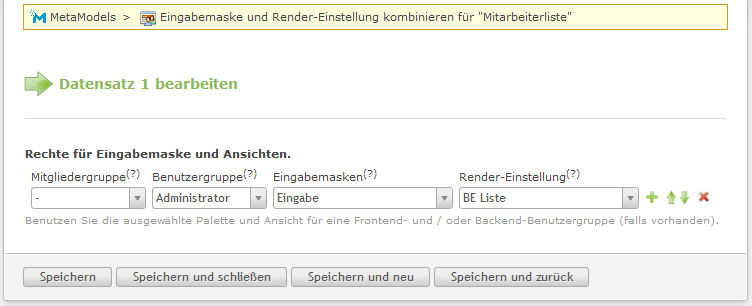
After “Save and close”, the view switches back to the MetaModels overview — at the same time, a new icon labelled “Employee List” should have appeared in the left Contao navigation (see screenshot).

With this step, the component settings for the backend are complete and data can be entered, or the frontend output can be configured.