Filter Rule as Exclusion
If you want to create a filter that does not “narrow down” an attribute but “excludes” it, this can be achieved with a special arrangement of filter rules.
The employee list can be used as an example. When a filter is created for the department, the results are narrowed down to exactly the department selected in the filter, i.e. only items where “department equals filter value” are output — e.g. “Filter all employees from the ‘Marketing’ department”.
However, if you want all departments except the one selected in the filter (i.e. excluding it, e.g. “Filter all employees who are not in the ‘Marketing’ department”), you can proceed as follows:
add a filter rule “OR condition” with the checkbox “Stop at first match” enabled
inside the OR condition, add a filter rule “Custom SQL” and a filter rule such as “Single select”
Afterwards the filter rules should be arranged roughly as shown in the screenshot.
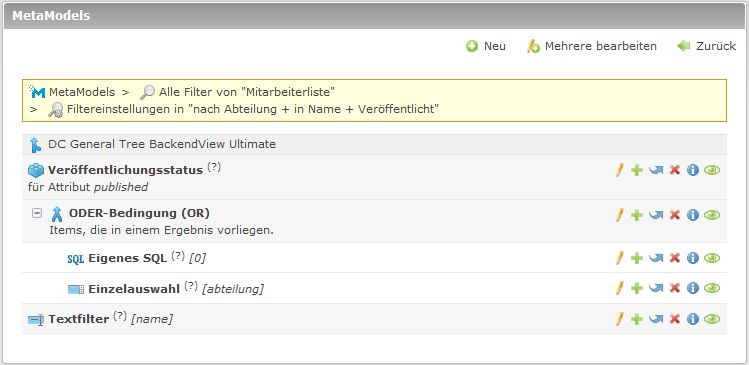
The following query is entered in the “Custom SQL” filter rule:
1SELECT id
2FROM {{table}}
3WHERE abteilung IN (
4  SELECT id
5  FROM mm_departments
6  WHERE alias != {{param::get?name=department}}
7  OR ({{param::get?name=department}} IS NULL)
8)
Background: The “Single select” filter rule is used solely for creating and displaying the form widget in the frontend. The actual filtering is performed by the “Custom SQL” filter rule. Processing of the further filter rule in the “OR branch” is interrupted, so the “Single select” filter rule never comes into effect.