Restricting Items in CE/FE Module MM List and MM Filter
The output of an MM list can be controlled via a filter — for example, if you have a list of employees that should be filtered by department.
You create a filter for “Department xy” and select it in the settings of the CE/FE module MM List.
However, if you want to display a specific department on multiple pages, it becomes cumbersome and confusing to create a separate filter for each department.
This can be avoided by using a filter rule “Simple lookup” for the “Department” attribute and enabling the “Static parameter” checkbox there.
Once this is done, an additional select field appears in the CE/FE module MM List filter settings. In our example, all departments would be listed there and you can select which department to display.
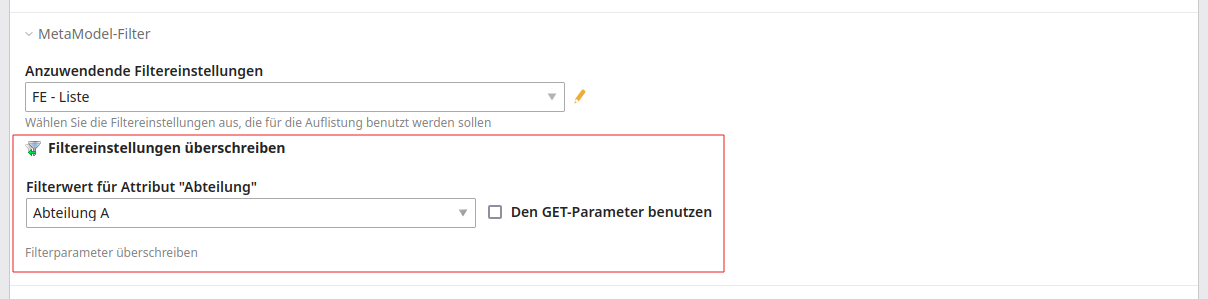
In the “Filter value for attributes *” selection, in addition to the attribute values, the setting “-” for an empty string and “- without data value [null] -” for the database value “NULL” are also available.
Note
If an empty string is selected, only items where the attribute value
is an empty string are output — if no assignment exists, this is typically
the database value NULL.
It is also possible to use multiple “Simple lookup” rules, for example if two departments can be selected, or a department and an additional categorisation.
As an alternative, you can provide editors with a corresponding predefined content element.
Note
From version 2.4, the setting is also available in the MM Filter.
The content element and the FE module MM Filter can now be preset in the same way as MM List. If a “Simple lookup” filter rule is set with the “Static parameter” option, the selection options for “Override filter settings” also appear here and restrict the remaining filter values accordingly, provided that the “Only remaining values” option is set for them.