Custom SQL
A detailed description of the “Custom SQL” filter rule can be found on the filter rule detail page — quick information is also available via the  help in the settings.
A reminder: even with the “Custom SQL” filter rule, only IDs are passed to the next filter rule or filter set. No “attribute values” can be added or computed, even though SQL would allow that via JOINs or mathematical expressions.
The following SQL queries serve as “ingredients” for your own “SQL menu”:
“LIKE” query with default value
“Search items where attribute ‘name’ matches GET parameter ‘name’, or return all items (no filtering) if not set.”
1SELECT `id`
2FROM {{table}}
3WHERE `name` LIKE (CONCAT('%',{{param::get?name=name&default=%%}},'%'))
Filter by date
“Search items where attribute ‘date_start’ is greater than or equal to today’s date — i.e. in the future.”
1SELECT `id`
2FROM {{table}}
3WHERE FROM_UNIXTIME(`date_start`) >= CURDATE()
or
1SELECT `id`
2FROM {{table}}
3WHERE DATE(FROM_UNIXTIME(`date_start`)) >= DATE(now())
Filter by date (start or “ongoing”)
“Search items where attribute ‘date_start’ is greater than or equal to today’s date — i.e. in the future — or items where the current date is between ‘date_start’ and ‘date_end’ (ongoing).”
1SELECT `id`
2FROM {{table}}
3WHERE
4( DATE(FROM_UNIXTIME(`date_start`)) >= DATE(NOW()) )
5OR
6( DATE(FROM_UNIXTIME(`date_start`)) <= DATE(NOW())
7  AND
8  DATE(FROM_UNIXTIME(`date_end`)) >= DATE(NOW())
9)
Filter by date (start/stop)
“Search items where attribute ‘start’ is greater than the current Unix timestamp and attribute ‘stop’ has not been reached yet. Empty attribute values are treated as irrelevant (then only ‘start’ or ‘stop’ applies).” [by “Cyberlussi”]
1SELECT `id`
2FROM {{table}}
3WHERE (`date_start` IS NULL OR `date_start` = '' OR `date_start` < UNIX_TIMESTAMP())
4AND (`date_stop` IS NULL OR `date_stop` = '' OR `date_stop` > UNIX_TIMESTAMP())
Alternative
1SELECT `id` FROM {{table}}
2WHERE (`date_start` IS NULL OR DATE(FROM_UNIXTIME(`date_start`)) <= DATE(now()))
3AND (`date_stop` IS NULL OR DATE(FROM_UNIXTIME(`date_stop`)) >= DATE(now()))
Filter by date (start) and publish date with GET check
For example for events that should be hidden after their start date is reached, but should only be shown from a certain date onwards — if set.
For testing, a GET parameter can be appended to the URL in the frontend — date format is “YYYY-MM-DD”, e.g. “domain.tld/my-list.html?now=2023-07-10”.
1SELECT id FROM {{table}}
2WHERE DATE(FROM_UNIXTIME(`date_start`)) >= DATE(now())
3AND (`date_published` IS NULL
4     OR DATE(FROM_UNIXTIME(`date_published`)) <= DATE(now())
5     OR DATE(FROM_UNIXTIME(`date_published`)) <= {{param::get?name=now}}
6)
Filter by date (start) last 12 months
Archive filter for past items within the last 12 months:
1SELECT id FROM {{table}}
2WHERE DATE(FROM_UNIXTIME(`date_start`)) < DATE(now())
3AND DATE(FROM_UNIXTIME(`date_start`)) >= DATE(now() - INTERVAL 12 month)
Filter by child elements of a parent element
“Find all child elements for a given parent element via the alias parameter — e.g. to output all associated ‘child elements’ on a detail page.”
1SELECT `id`
2FROM mm_child
3WHERE `pid` = (
4  SELECT `id`
5  FROM mm_parent
6  WHERE
7  `parent_alias` = {{param::get?name=auto_item}}
8  LIMIT 1
9)
Filter by parent element of a child element
“Find the parent element for a given child element via the alias parameter — e.g. to output the associated ‘parent element’ on a detail page.”
1SELECT `id`
2FROM mm_parent
3WHERE `id` = (
4  SELECT `pid`
5  FROM mm_child
6  WHERE
7  `child_alias` = {{param::get?name=auto_item}}
8  LIMIT 1
9)
or shorter
1SELECT `pid` as id
2FROM mm_child
3WHERE `child_alias` = {{param::get?name=auto_item}}
Sorting output by more than one attribute (fixed)
“Sort ‘teams’ by points descending + games ascending + priority descending.” See also Forum
Note that this SQL rule is placed as the first rule in the filter. In the first rule — if it returns a list of items — the “base set” and the order of items is determined, and subsequent rules can only reduce this set. The sort direction in MySQL is always ASC by default — for a different direction, specify it for each sort column.
1SELECT `id`
2FROM mm_teams
3ORDER BY `points` DESC, `games` ASC, `prio` DESC
Sorting output by a number and NULL values or random
Note that this SQL rule is placed as the first rule in the filter. Display items by a custom sort number, with all items without a number (NULL) at the end:
1SELECT `id`
2FROM mm_sv_categories
3ORDER BY ISNULL(`sort_number`), `sort_number` ASC
You can also display certain items first (attribute “prio_slider” = 1) and the rest in random order:
1SELECT `id`
2FROM mm_sv_trainings
3ORDER BY `prio_slider` DESC, rand()
Sorting output by referenced MetaModel and name
For example, if you have a MetaModel for products where each product references a partner via single select [select], and you want to output the products sorted first by the partner’s manual sorting (sorting) and then by the actual product name, this can be achieved with the following code:
1SELECT pro.id FROM mm_products AS pro
2LEFT JOIN mm_partners AS part ON pro.partner = part.id
3WHERE pro.published = 1
4ORDER BY part.sorting, pro.product_code
In the output list, this could be used to output an intermediate heading for each new partner. Store the current partner ID in a temporary variable and check for equality on each loop pass — if not equal, output “partner name”.
Dynamic default value
In custom SQL, default values are possible via ‘default=<value>’, which are used when the filter parameter is not set. Currently, nesting of insert tags or use of MySQL functions is not possible within the param tag, so dynamic defaults require a workaround using “SQL IF”. See also GitHub #880
1SELECT `id` FROM mm_months
2WHERE FROM_UNIXTIME(`from_date`) <= IF(
3   {{param::get?name=von_datum}},
4   {{param::get?name=von_datum}},
5   CURDATE()
6)
7ORDER BY `from_date` DESC
Default value ‘’
In custom SQL, default values are possible via ‘default=<value>’, which are used when the filter parameter is not set. Currently, entering ‘’ or “” in the param tag is cast in a way that causes incorrect filtering; this applies for example to checkbox values.
1SELECT `id` FROM mm_employees
2WHERE `driver_licence` = IF(
3   {{param::get?name=driver_licence}},
4   {{param::get?name=driver_licence}},
5   ''
6)
Passing multiple values for IN()
Multiple values can be passed to the query as a comma-separated list or array — depending on the type of the input, the aggregate parameter uses the value list or set.
1-- as list
2-- domain.tld/en/list?id=13,15,19
3SELECT id FROM {{table}}
4WHERE id IN ({{param::get?name=id&aggregate=list}})
5
6-- as array
7-- domain.tld/en/list?id[]=13&id[]=15&id[]=19
8SELECT id FROM {{table}}
9WHERE id IN ({{param::get?name=id&aggregate=set}})
Filter items by single select property
Employees have a single select [select] attribute linked to the MetaModel “Department”. For a list view of employees, only those working in a department with a “score” greater than 99 should be shown.
1SELECT `id` FROM mm_employees
2WHERE `department` IN (
3   SELECT `id` FROM mm_departments
4   WHERE `score` > 99
5)
or
1SELECT ma.id FROM mm_employees ma
2LEFT JOIN mm_departments rel ON (ma.department = rel.id)
3WHERE rel.score > 99
Filtering a select in the BE for a non-MM table
If the single select [select] attribute is configured with a table that is not an MM table, a “WHERE restriction” input is available as filtering option. For example, if you want a connection to the member table “tl_member” but restrict it so that each member can only be selected once, use the following:
1(SELECT tl_member.id FROM tl_member
2 LEFT JOIN mm_member
3        ON mm_member.memberId=tl_member.id
4   WHERE
5         mm_member.memberId IS NULL
6   AND
7         tl_member.id=sourceTable.id)
Extracting an ID from a GET parameter after ‘::’
For filtering in the backend or for frontend editing, you may need access to the ID from the GET parameter in the URL. However, it is coupled with a table name via ‘::’ and must be separated for use in a custom SQL query. This can be done using SUBSTRING_INDEX in the query, as shown in the following example:
1-- URL: ....&id=mm_employees::51&...
2SELECT * FROM mm_employees
3WHERE `id` = SUBSTRING_INDEX({{param::get?name=id}},'::',-1)
Filter for multi-select in the input mask: only unselected items
For example, if you have a table for regions with a multi-select attribute linked to countries, and you want to restrict the selection to countries not yet assigned, you can activate a filter on the multi-select attribute (ID: 42) for countries. In the filter, a “Custom SQL” filter rule can be set up as follows:
 1SELECT `id`
 2FROM mm_countries
 3WHERE `id` NOT IN (
 4    SELECT `value_id` as id
 5    FROM tl_metamodel_tag_relation
 6    WHERE `att_id` = '42'
 7) OR id IN (
 8    SELECT `value_id` as id
 9    FROM tl_metamodel_tag_relation
10    WHERE `att_id` = '42'
11    AND `item_id` = SUBSTRING_INDEX({{param::get?name=id}},'::',-1)
12)
Distinguishing between frontend and backend
Note
In MM 2.3, a selection was added to the filter rule to specify the execution environment, e.g. “Backend only”. This allows the SQL queries to be simplified.
When filtering with custom SQL, it may be necessary to distinguish between frontend and backend. Since MM 2.2, filters configured for Select and Tags attributes are also applied in the frontend, which can cause issues with filter rules intended only for the input mask.
You can query the current request string and search for your model name, e.g. “mm_employees”, as the first word.
1SELECT artd.id FROM mm_article_details artd
2LEFT JOIN tl_metamodel_tag_relation rel ON (artd.id = rel.item_id)
3WHERE
4IF (SUBSTRING_INDEX(SUBSTRING_INDEX('{{env::request}}', '/', -1), '?', 1) = 'mm_employees',
5   rel.att_id = 43 AND                                             -- 43 ID of the [tags] attribute
6   rel.value_id = SUBSTRING_INDEX({{param::get?name=id}},'::',-1), -- variable ID from URL for article/product
7   1=1
8)
Note
With MM version 2.3-beta1, the routing in the BE changed — instead of
domain.de/contao?do=metamodel_mm_employees&act=edit... it is now
domain.de/contao/metamodel/mm_employees?act=edit, meaning the query
SUBSTRING_INDEX(SUBSTRING_INDEX('{{env::request}}', '/', -1), '?', 1)
previously returned the value “contao”.
Comments in SQL queries
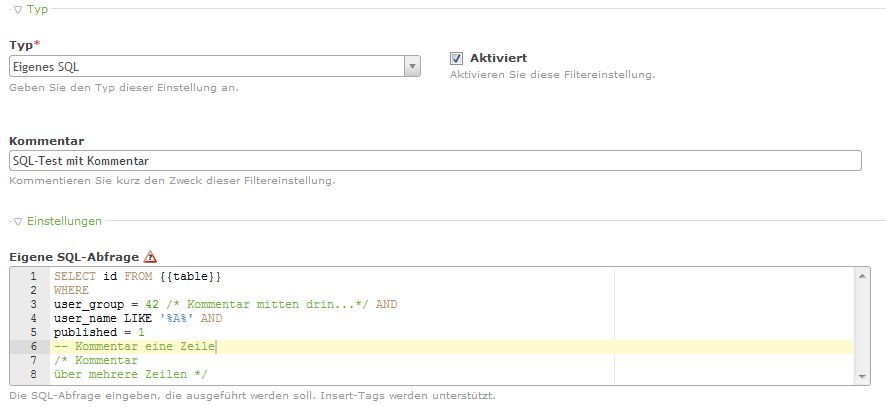
SQL queries can sometimes become quite complex and contain fixed values such as attribute IDs etc. To keep track later or when working in a team, comments can be added here as well — more at the MySQL reference manual.
Example: