Input Mask: Custom RegEx Validation
If you need custom regex validation for a text input field in an input mask, this can be implemented using the following event listener.
To integrate it and activate it for the field in the input mask, the validation must first be made available using Contao’s built-in tools.
For this, the hook “addCustomRegex” is set up as follows — see API: addCustomRegex
Note
The following description still applies to Contao 4.4 — current implementations should be placed in the src/ folder.
Create a folder for your own module under /system/modules — e.g. “/metamodels_mycustoms”
Create two further folders “/config” and “/classes” inside metamodels_mycustoms
In the /classes folder, create the file “MyClass.php” as described in the Contao API
In the /config folder, create the file “config.php” as described in the Contao API
Additionally in the /config folder, create the file “event_listeners.php” — the key of the $options array must be identical to the value checked for $strRegexp in /MyClass (‘plz’)
Once all files are created and filled with source code, the “autoload.php” can be generated via the developer tools in the Contao backend under “Autoload creator”
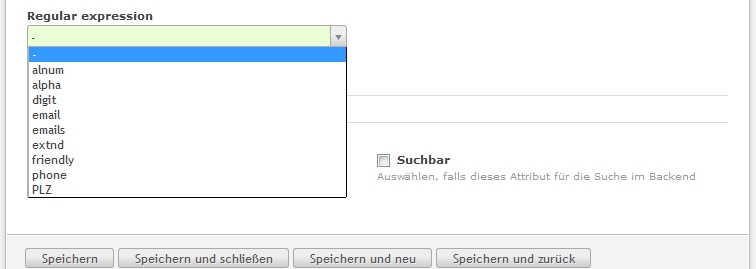
In the settings of an input field for a “Text” attribute, the entry “PLZ” should then be available in the RegEx validation selection. If this is not the case, try clearing all caches in the backend and checking the files.
Source Code
The files contain the following source code:
File /system/modules/metamodels_mycustoms/classes/MyClass.php
 1<?php
 2class MyClass
 3{
 4    public function myAddCustomRegexp($strRegexp, $varValue, Widget $objWidget)
 5    {
 6        if ($strRegexp == 'plz')
 7        {
 8            if (!preg_match('/^[0-9]{4,6}$/', $varValue))
 9            {
10                $objWidget->addError('Field ' . $objWidget->label . ' should contain a valid postal code.');
11            }
12
13            return true;
14        }
15
16        return false;
17    }
18}
File /system/modules/metamodels_mycustoms/config/config.php
1<?php
2$GLOBALS['TL_HOOKS']['addCustomRegexp'][] = array('MyClass', 'myAddCustomRegexp');
File /system/modules/metamodels_mycustoms/config/event_listeners.php
 1<?php
 2use ContaoCommunityAlliance\DcGeneral\Contao\View\Contao2BackendView\Event\GetPropertyOptionsEvent;
 3
 4// Event listener with priority "-1"
 5return array
 6(
 7    GetPropertyOptionsEvent::NAME => array(
 8        array(
 9            function (GetPropertyOptionsEvent $event) {
10                if (($event->getEnvironment()->getDataDefinition()->getName() !== 'tl_metamodel_dcasetting')
11                    || ($event->getPropertyName() !== 'rgxp')) {
12                    return;
13                }
14
15                $options = $event->getOptions();
16
17                // Key "plz" equals $strRegexp check from myAddCustomRegexp
18                $options['plz'] = 'PLZ';
19
20                $event->setOptions($options);
21            },
22            -1
23        )
24    )
25);
The autoload.php in /system/modules/metamodels_mycustoms/config should look like this after generation:
1<?php
2ClassLoader::addClasses(array
3(
4    // Classes
5    'MyClass' => 'system/modules/metamodels_mycustoms/classes/MyClass.php',
6));
Note: The regex validation was taken from the Contao documentation and represents only a very basic check for postal codes. More precise regex validations can be found online, or a check against a list of valid postal codes could be implemented here.