Changes and Features in MM 2.2
The following is an overview of the changes and features in MetaModels 2.2, made possible through the “early adopter program” — more on this under Fundraising on the MM website.
For a checklist after upgrading to MM 2.2, see further notes below.
General and Core
MetaModels 2.2 brings full compatibility with Contao 4.9 along with various features and optimizations. For example, MM 2.2 is compatible with the strict mode of higher MySQL versions or current MariaDB, and supports manual file sorting.
The installation prerequisites for MetaModels 2.2 are:
A running Contao 4.9.x (LTS)
PHP 7.4
MySQL from 5.5.5 (InnoDB), MariaDB (including “strict mode”)
memory_limit512MB or more (recommended)
Higher versions of Contao may be possible but are not officially supported.
Compatible with the strict mode of MySQL and MariaDB; all queries rewritten to use queryBuilder and table prefixes added to queries — this eliminates the need to check for MySQL-reserved words
Various optimizations for faster data display
MM backend “cleaned up” and typical settings set as defaults (approximately 30% fewer clicks when creating)
All repositories switched to Github Actions for automatic code checks
The backend panel (area above the list view) now uses standard Contao icons for filtering and filter reset instead of the “yellow arrows”
In the area of translated MetaModels, significant code was refactored — for example, a new interface ITranslatedMetaModel was added for a simpler and cleaner interface for data access. For the “MM end user”, nothing visibly changes initially, but it simplifies and secures the multilingualism work/development in MM.
Revision of all migrations for strict mode support — now case sensitive for column names
Removal of xhtml template files no longer supported by Contao; the migration displays a notice when old MM xhtml template files no longer supported by Contao are found — unfortunately these cannot be adjusted automatically.
Search and filtering by name or type in the attribute list
Removed faulty DCA popups from input mask settings — replaced with helper popup (“road sign”)
Support for caching (ESI tags)
Improved display when selecting attributes — now in the format ‘Attribute-Name [Type, “column name”]’
New frontend output template for debug display: metamodel_prerendered_debug.html5
For the jump-to URL, both a page and a filter previously had to be specified in the render settings — now only the page selection is required and the URL is output in the list template. This allows, for example, creating a link from the backend detail page back to the list page without specifying a filter. To check whether filter parameters are set, there is now a “deep” node — it is true when parameters are present.
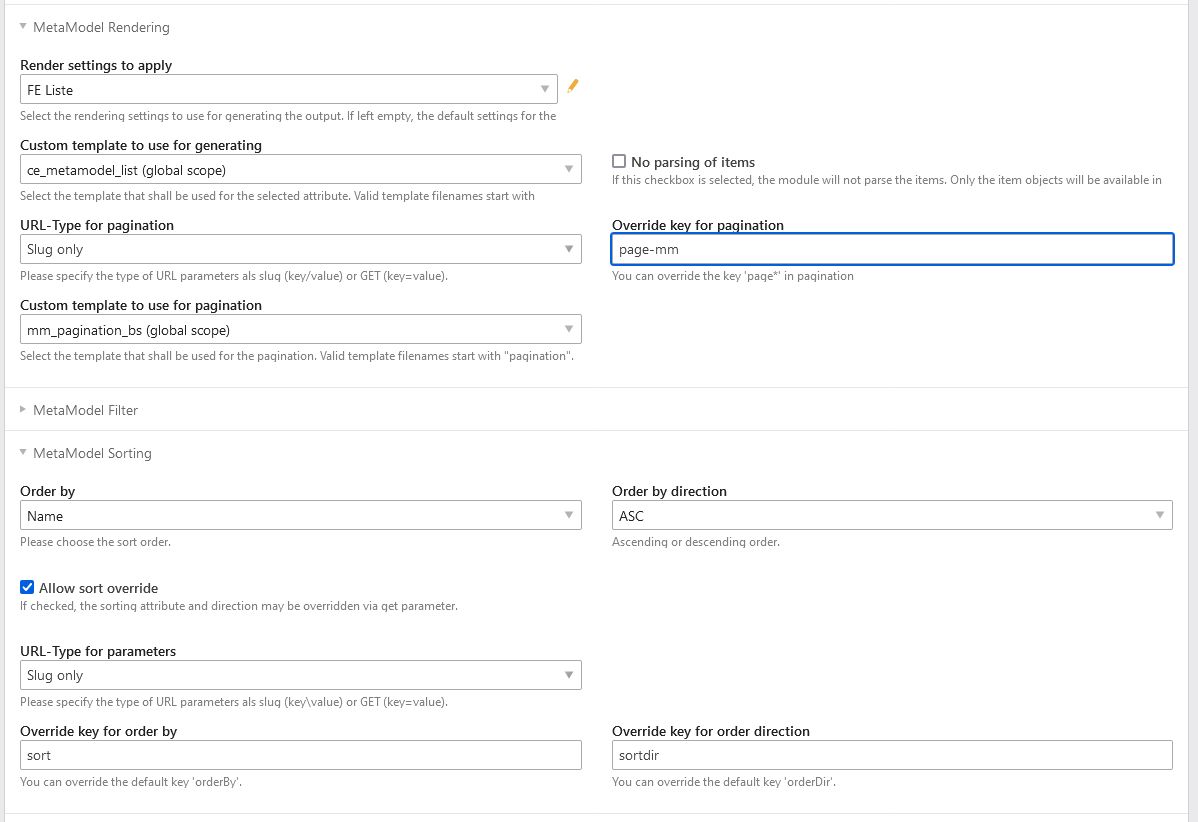
New options for pagination in MM list output (see screenshots below)
Dynamic parameter prevents “cross-talk” between pagination of different lists
The pagination parameter name can be freely chosen
A custom template for pagination is possible — default is “mm_pagination.html5”
You can choose whether the parameter is passed via slug (/page_mmce42/3) or GET (?page_mmce42=3)
Pagination links can include a URL fragment (anchor) — update custom templates if needed
New options for overriding sorting in MM list output (see screenshots below)
The names of the standard parameters “orderBy” and “orderDir” can be overridden with custom values
The parameters can be passed as slug and/or GET
New option for passing custom parameters from list output settings (CE/FE module) to the list template. Custom key-value pairs can be created via a MCW and are available in the template via “$this->params” as an array. This allows further generalizing a list template and controlling it from the backend with labels, translations, parameters for output, or JavaScript content. See Custom Parameters for the MM List Output in the Frontend.
Item counting in FE filter widgets has been disabled — see Github
In the MM list content element, the filter selections of the “Static parameter” are now visible in the article list view in addition to the filter name
New insert tag for item count (total count): {{mm::total::mm::[MM Name|ID](::[ID filter])}} — no extra MM CE/module needed
The MM insert tag “Item” previously included by default a filter for a possible checkbox with “Publish” activated — to match the behavior of MM lists, this automatic check in the insert tag was removed
Attributes as variants have a marking in the attribute list
All SQL queries now use table prefixes, so checking for MySQL reserved words is no longer necessary
View conditions for input mask widgets were adjusted: a “non-selection” of e.g. a select or tags parameter is now correctly evaluated, meaning when “Nothing” is selected as the condition, the widget is visible — until something is selected (this saves a NOT operator)
In the “Add all” mask for input masks, there is now an input field to immediately assign one or more CSS classes to attributes — when adding attributes individually, the default CSS class is “w50” — this feature saves individual editing of attributes
When creating an attribute and clicking “Save and new”, the attribute type is retained and pre-selected
When an attribute is deleted, any associated view condition or sorting/grouping is now automatically deleted
For multilingualism, territory specifications in locales are now also supported — e.g. ch_DE, ch_FR etc.; in the model settings, a checkbox can extend the “languages” list with territory entries; the list shows how each entry must appear in the website root node
The display of the input mask for variants was adjusted. Previously, attributes without variation were hidden in the variant mask — they are now displayed as readonly.
Attributes
- Alias
Slug generator for special characters
Option to prevent “id-” prefix for numbers
- Checkbox
Optional custom icons are rendered as 16x16px thumbnails
If checkboxes are readonly, they are displayed in the list view but have no toggle function
Widget as readonly now works correctly in the input mask
- ContentArticle
Both the input mask and the list view now show a preview of the created elements including type and visibility
- File
Support for manual file sorting
Now works with “picture factory” — supporting lazy loading of image settings
“Read only” (readonly) option is now available
The restriction to “files only” has been extended to also allow “folders only” — default remains files and folders
Support for image size in a lightbox using values from layout settings
A placeholder image can be selected
Option whether a download link is protected via session or not; for backwards compatibility, the value is set via migration if the “Download link” checkbox is enabled; if protection is disabled, no cookie is set and the page can be cached
- Date
In the input mask settings, you can specify which part of the timestamp should be “set to zero”, so that e.g. time without a date or a date without a time can be stored — this can be important for correct filtering by time or date
- Single select [select]
With the new ITranslatedMetaModel interface, a translated alias can now be used as the alias in attribute settings — previously this had to be an attribute with “unique” values
With the switch to the ITranslatedMetaModel interface, the API expects the widgetToValue method to receive the data value selected as alias — previously fixed to id
Widget as readonly now works correctly in the input mask; also in the popup picker
A filter activated in attribute settings now also affects the FE output — e.g. referenced items are no longer output if a filter limits them, analogous to the BE display (note for “Custom SQL”)
- Levenshtein-based search (full-text indexing with similarity search)
Renamed to correct spelling (“sht” instead of “sth”) — please check in composer.json
Automatic disabling of autosubmit for CE/module MM filter was removed — no longer necessary due to new settings
Setting for word length (min + max) that is searched in the index
Explanation of settings at the attribute
Autocomplete in the FE search widget switched from Mootools to “Vanilla Script” — now independent of Mootools — note the selection of the (new) template
Autocomplete can be disabled and minimum letter count can be specified
For filter settings, the corresponding template must be selected for autocomplete; autocomplete can also be disabled via checkbox — additionally it can be enabled to submit the form when clicking an autocomplete entry
- Multi-select [tags]
With the new ITranslatedMetaModel interface, a translated alias can now be used as the alias in attribute settings — previously this had to be an attribute with “unique” values
With the switch to the ITranslatedMetaModel interface, the API expects the widgetToValue method to receive the data value selected as alias — previously fixed to id
Widget as readonly now works correctly in the input mask; also in the popup picker
A filter activated in attribute settings now also affects the FE output — e.g. referenced items are no longer output if a filter limits them, analogous to the BE display (note for “Custom SQL”)
- Rating (“star rating”)
Switched from Mootools to “Vanilla Script” — now independent of Mootools
Sorting in the BE now considers the number of ratings
- Text table
Settings for specifying minimum and maximum number of rows
Checkbox to disable manual sorting
- Translated alias
Slug generator for special characters
Option to prevent “id-” prefix for numbers
- Translated checkbox
Optional custom icons are rendered as 16x16px thumbnails
A custom icon set can be selected per language
In the list view, icons are now in the order in which the model’s languages are defined — previously the fallback language icon was always in the first position
If checkboxes are readonly, they are displayed in the list view but have no toggle function
Support for the “Inverse” option, which reverses the display behavior; this allows mimicking the Contao core behavior for content elements that are always visible and are toggled to hidden via checkbox. Note: the icons in the backend list view also switch accordingly.
- Translated ContentArticle
Both the input mask and the list view now show a preview of the created elements including type and visibility
- Translated file
Support for manual file sorting
Now works with “picture factory” — supporting lazy loading of image settings
“Required” option is now available
“Read only” (readonly) option is now available
The restriction to “files only” has been extended to also allow “folders only” — default remains files and folders
Support for image size in a lightbox using values from layout settings
A placeholder image can be selected
Option whether a download link is protected via session or not; for backwards compatibility, the value is set via migration if the “Download link” checkbox is enabled; if protection is disabled, no cookie is set and the page can be cached
- Translated text table
Settings for specifying minimum and maximum number of rows
Checkbox to disable manual sorting
Filters
- CE/module FE filter and filter reset (clear all)
The autosubmit for CE/module FE filter is now written in Vanilla Script — independent of Mootools or jQuery
The CE/module filter reset now has its own template (mm_clearall_default.html5) which is also immediately selected when creating. Previously you had to switch the template from “mm_filter_default” to “mm_filter_clearall” when creating. The migration outputs a notice if a custom template “mm_filter_clearall*.*” is still found, requesting you to update it — unfortunately these cannot be adjusted automatically. If an error message appears in the FE that the old template cannot be found, simply re-save the CE/FE module.
FE filter widgets now have the “used” property with values “true|false” — “true” when the widget is being used
Item count display in FE filter widgets is no longer supported — templates were updated accordingly. See explanation on Github
The CE/module MM filter now accepts a URL fragment — this causes the page to jump to the anchor after reload (update custom link list templates if needed)
The CE/module MM filter reset now accepts a URL fragment — this causes the page to jump to the anchor after reload
Filter widget output templates were revised for clean markup — see Github issue — update custom templates if needed
- Custom SQL
Parameter insert tags can now contain additional (Contao) insert tags — e.g.
SELECT * FROM WHERE year = {{param::get?name=year&default={{date::Y}}}}
is now possible. Additionally, the insert tag now returnsnullwhen the parameter key does not exist.
- Simple lookup
Option to suppress output of the filter widget label
CSS ID and CSS classes for FE widget can be specified
Option to enable FE widget output for the filter rule (in MM 2.0 this was set via “Static parameter” and “GET parameter” options — please migrate manually)
Option to sort filter items by “natural sort” — ascending or descending
The label can be used as the blank option label in the select (instead of “Do not filter”) via checkbox
- Single select [select]
Alias and translated alias attribute types are possible
Option to suppress output of the FE widget label
CSS ID and CSS classes for FE widget can be specified
Option to sort filter items by “natural sort” — ascending or descending
The label can be used as the blank option label in the select (instead of “Do not filter”) via checkbox
- Yes / No
In addition to GET values “1” and “-1”, the values “yes” and “no” can be submitted (or the respective translation)
“Translated checkbox” attribute type is possible
Option to suppress output of the FE widget label
CSS ID and CSS classes for FE widget can be specified
- Levenshtein-based search (full-text indexing with similarity search)
See under Attributes
- Multi-select [tags]
Alias and translated alias attribute types are possible
Option to suppress output of the FE widget label
CSS ID and CSS classes for FE widget can be specified
Option to sort filter items by “natural sort” — ascending or descending
- Register (filter for initial letters)
Correct output of active CSS classes
Optionally can filter by multiple letters
Option to suppress output of the FE widget label
CSS ID and CSS classes for FE widget can be specified
- Perimeter search
New lookup service “Coordinates” added. This allows working directly with coordinates and adding an “Own location” button
For range selection, the ability to set a preset as default has been added; e.g. if range presets are 5, 10, 20, 50 km, the default of the select in the FE can be set to 10 km.
- Value from/to for one field (from-to)
Option to suppress output of the filter widget label
CSS ID and CSS classes for FE widget can be specified
Placeholder for FE widget
- Value from/to for two fields (range)
Option to suppress output of the FE widget label
CSS ID and CSS classes for FE widget can be specified
Placeholder for FE widget
There are now five different variants of how the filter should behave when comparing existing values in the database with the entered filter values; a description of the variants can be accessed via the
 help assistant (popup).
Frontend Editing (FEE)
Overview of supported attributes — see Github
File upload support including various parameters such as target folder, dynamic path specifications, filename cleanup, preview images, etc. — Optionally with Dropzone.js support for one or more files
Support for “Color picker” and “URL” attributes, each rendered with two input fields.
Configuration of input mask buttons in FEE including option for redirect page and “Do not save”; the redirect page option can be dynamically configured with Simple Tokens
Integration of the Notification Center for sending emails on create/copy/edit/delete of records in FEE
Support for MCW in FEE with (Vanilla Script) e.g. for text table and multi-widget table attributes for duplicating and sorting rows
Support for min/max on text table and multi-widget table attributes in the FE
In the FEE input mask, widgets have a CSS class consisting of prop-<column-name-attribute>, so they can be better arranged/styled via CSS
A clean exception is thrown when a record cannot be deleted
In the CE/module “MetaModels Frontend Editing”, a custom template for the wrapper can now be selected — the default template includes JavaScript and CSS for updating the mask on view conditions; additionally there is a template without the two included files
Screenshots
Settings for pagination and sorting in the MM list:
Checklist for Upgrading to MM 2.2
In general, an upgrade within the MM 2.x branch is straightforward and any necessary adjustments to labels and DB changes are handled via migrations. However, there are a few things that cannot be caught automatically. For this reason, the following points should be kept in mind when upgrading to MM 2.2:
Custom code should be checked whether the “widgetToValue” method for the select and tags attributes receives the value for “Alias” as selected in the attribute settings — e.g. when processing form data; previously an ID was always expected
For pagination, the GET parameter is no longer just “page” — a unique key is generated for each pagination; you can override this via the new pagination settings if desired
If pagination does not display in the FE after the upgrade, open the CE/FE module list in the BE and re-save it — the assignment for the new pagination template may be stuck
Pagination links can include a URL fragment (anchor) — update custom templates if needed
The CE/FE module “Clear all” now has its own template — check this if needed
Custom templates for filter widgets may need to be updated for the new template
For the “Simple lookup” filter rule with desired widget output in the FE, a separate checkbox must be set on the filter rule
Filters set for the select and tags attributes now also apply to the FE output; if these are only for filtering the input mask, the query may need to be adjusted — see here
JavaScript support has been switched to “Vanilla Script” in the core, attributes, and filters — dependencies on jQuery or Mootools are no longer present. Update custom scripts if needed.
For the select and tags attributes — when the relation points to a non-MM table — a WHERE restriction can be specified. The table alias “t” for tags and “sourceTable” for select must be used.
For Levenshtein-based search, note the new spelling (sht instead of sth) as well as the template selection for autocomplete in the filter rule settings
Various features are now available “out-of-the-box” such as the placeholder image, so custom workarounds can be removed.
Re-Financing
See also
For refinancing the extensive work, the MM team requests financial contributions. As a guideline, approximately 10% of the project scope should be budgeted — based on experience from past contributions, amounts are between 100€ and 500€ (net) — an invoice including VAT will always be provided. More…