Custom Section in the Backend Navigation
Access to MetaModel data entry is often best placed in a dedicated section in the backend navigation. To do this, a corresponding group must be created, to which the desired model(s) can be assigned in the input mask properties under “Backend section”.
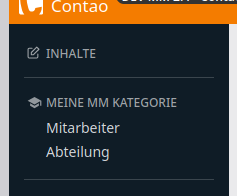
This requires an SVG icon and an assignment via the Contao MenuEvent — it is planned that this will be configurable via an entry in config.yaml in the future.
SVG icons can be downloaded from e.g. material.io — the width, height, and fill colour should be adjusted as shown in the example using a text editor:
1 <svg xmlns="http://www.w3.org/2000/svg" fill="#91979c" width="15" height="15" viewBox="0 0 24 24">
2     <path d="...."/>
3 </svg>
The file can be saved e.g. at files/backend/group_icon_mm-test.svg (make the folder public).
An event listener is also required to create the entry — the group can be configured via the following parameters (lines 30 to 34):
$nodeName — alias of the entry
$nodeTitle — title
$nodeIcon — path to the icon
$targetNode — search for an existing entry such as “content” for content items
$targetType — whether the entry should appear
beforeorafterthe “targetNode”
Place the listener at src/EventListener/BackendMenuListener.php and run composer install.
 1<?php
 2
 3namespace App\EventListener;
 4
 5use Contao\CoreBundle\Event\MenuEvent;
 6use Knp\Menu\Util\MenuManipulator;
 7use Symfony\Component\EventDispatcher\Attribute\AsEventListener;
 8use Symfony\Component\HttpFoundation\RequestStack;
 9use Symfony\Component\HttpFoundation\Session\Attribute\AttributeBagInterface;
10
11#[AsEventListener(priority: -1)]
12class BackendMenuListener
13{
14    private array $targetTypes = ['before' => 0, 'after' => 1];
15
16    public function __construct(
17        private readonly RequestStack $requestStack,
18    ) {
19    }
20
21    public function __invoke(MenuEvent $event): void
22    {
23        $factory = $event->getFactory();
24        $tree    = $event->getTree();
25
26        if ('mainMenu' !== $tree->getName()) {
27            return;
28        }
29
30        $nodeName   = 'mm-test';
31        $nodeTitle  = 'My MM Category';
32        $nodeIcon   = '/files/backend/group_icon_mm-test.svg';
33        $targetNode = 'content';
34        $targetType = 'after';
35
36        $categoryNode = $tree->getChild($nodeName);
37        if (!$categoryNode) {
38            $sessionBag  = $this->requestStack->getSession()->getBag('contao_backend');
39            $status      = ($sessionBag instanceof AttributeBagInterface) ? $sessionBag->get('backend_modules') : [];
40            $isCollapsed = ($status[$nodeName] ?? 1) < 1;
41
42            $categoryNode = $factory
43                ->createItem($nodeName)
44                ->setLabel($nodeTitle)
45                ->setUri('/contao?mtg=' . $nodeName)
46                ->setLinkAttribute('class', 'group-' . $nodeName)
47                ->setLinkAttribute('title', $nodeTitle)
48                ->setLinkAttribute('data-action', 'contao--toggle-navigation#toggle:prevent')
49                ->setLinkAttribute('data-contao--toggle-navigation-category-param', $nodeName)
50                ->setLinkAttribute('aria-controls', $nodeName)
51                ->setLinkAttribute('aria-expanded', $isCollapsed ? 'false' : 'true')
52                ->setChildrenAttribute('id', $nodeName)
53                ->setLinkAttribute('style', \sprintf('background: url(%s) 3px 2px no-repeat;', $nodeIcon))
54                ->setExtra('translation_domain', false);
55
56            if ($isCollapsed) {
57                $categoryNode->setAttribute('class', 'collapsed');
58            }
59
60            $tree->addChild($categoryNode);
61
62            $targetPosition = \array_search($targetNode, \array_keys($tree->getChildren()), true);
63            $targetPosition = false === $targetPosition ? 0 : $targetPosition + $this->targetTypes[$targetType];
64            $manipulator    = new MenuManipulator();
65            $manipulator->moveToPosition($categoryNode, $targetPosition);
66        }
67    }
68}
69?>
The listener and a dummy SVG are available here for download.